
NEW
Booking data, wherever you need it:


It's 9:55 a.m. You have a 10:00 in the corner conference room. The Outlook invite says confirmed. At 9:58 another group is setting up. Someone forgot to cancel the recurring meeting two months ago. The room has been ghost-booked every Tuesday since.
This is what a meeting room booking system on Office 365 alone looks like at scale. Resource mailboxes can't detect occupancy. Bookable Desks in Teams require Shared Space licenses to scale. None was built for your shared spaces end-to-end, so leadership keeps asking utilization questions you can't answer.
The fix isn't a different calendar. Think of Office 365 as the interface, and a dedicated platform as the operating layer underneath. The interface stays. The operating layer takes on governance, analytics, and the spaces native tools can't reach. Here's what's in the box, where it breaks, and when to layer one in.
Microsoft's room and desk booking story is not one tool. It's four, each with a different audience and a different setup story. Knowing which one does what saves a lot of frustration before you ever start configuring.
The oldest and most common approach. Your Exchange admin creates a mailbox for each meeting room, employees invite the room to a meeting as if it were a person, and Outlook's Scheduling Assistant or Room Finder shows whether the room is free.
This works well for small offices with a handful of rooms and stable bookings. It does not handle related resources (no catering, no equipment, no visitor sign-ins), and the only “control” is whether a room auto-accepts or requires manual approval.
Microsoft's newer answer to desk booking. Admins set up either desk pools (a group of seats; multiple people can reserve until the pool is full) or individual desks (one specific seat reserved by one person). Once configured, employees book in Teams by going to Calendar → New → Desk, or they get an auto-reservation just by plugging into a peripheral on a known desk.
The auto-reservation flow is useful for hot-desking offices. The setup, less so, which we'll come back to.
Released to general availability over the last year, Microsoft Places sits on top of resource mailboxes and Bookable Desks to give admins a buildings-and-floors view of the office. It adds floor-level wayfinding, work-location signals, and a map-based booking experience. It's the closest Microsoft has come to a unified workspace booking surface, and it's still maturing.
Microsoft Bookings is for appointment scheduling: booking a customer into a 30-minute consultation, a tutoring slot, or a healthcare visit. It is not for booking your own employees into your own conference rooms. If you've been searching for a meeting room booking system and Microsoft Bookings keeps appearing in the results, that's why it didn't fit your needs. They're different products serving different needs.
All four of those tools work well, but within their own narrow lanes. The trouble starts when you try to make them carry the weight of a real workspace management system across multiple sites, mixed space types, and a leadership team asking for utilization data.
Microsoft's own documentation for Bookable Desks tells you what's involved in standing it up. You need access to the Teams Rooms Pro Management portal. You need to create resource accounts in Exchange and wait 24 to 48 hours for them to appear across Outlook, Teams, and the portal. You need to associate each desk with the peripherals on it (monitors, dock IDs, vendor IDs), either by running PowerShell scripts or by waiting for “multiple unique users” to trigger auto-association.
None of this is wrong; it's just real work. For a 500-employee office with mixed desk types and a few hundred peripherals, the rollout is a project, not a weekend setup.
Resource mailboxes auto-accept or require approval. That's the policy surface. There's no native way to enforce:
These are the rules workplace teams reach for once ghost bookings start eating into actual availability. You can build approximations of some of them with Power Automate flows or third-party Outlook add-ins, but every workaround adds another moving part for IT to maintain.
Individual desk booking, where employees pick a specific seat instead of joining a pool, is available to anyone but requires an additional Shared Space license, which is $8 per license (covers four desks). That's a paid add-on on top of standard Microsoft 365 licensing.
Multiply Teams Premium per-user pricing by your full headcount, and the cost adds up faster than the initial M365 licensing line item suggests. A dedicated booking platform billed per-space (which is how Skedda prices) breaks the link between headcount and booking cost. A 1,500-employee office with 300 bookable spaces pays for 300 spaces, not 1,500 users.
If this matches what your team is dealing with, see how Skedda's Microsoft 365 desk booking integration handles it.
Five concrete signs say it's time to layer in a dedicated platform.
1. You manage more than rooms and desks.
Parking spots, lab equipment, podcast studios, EV chargers: none of these live cleanly inside Microsoft's room-and-desk model. If your operation includes any of them, you're either stretching the system or maintaining a separate process for the spaces it can't handle.
2. Leadership is asking utilization questions you can't answer.
“How much of our office is actually being used?” “Which conference rooms are over-subscribed?” “What's our average no-show rate?” The Bookable Desks reports in Teams Rooms Pro Management cover individual-desk utilization, but cross-resource analytics across rooms, desks, and everything else in one view isn't there.
3. You have multiple sites with different policies.
Resource mailbox rules are mostly global. If headquarters needs one set of booking policies and your London office needs another, you're either compromising on a one-size-fits-all approach or building bespoke automation per site.
4. You need visitor management in the same workflow.
When a guest shows up for a meeting, the receptionist needs to know who they're seeing, where the meeting is, and what's happening with security or NDA paperwork. Outlook can attach a person to a meeting; it can't manage a visitor management lifecycle.
5. Your IT team is the bottleneck for every booking rule change.
Adjusting auto-accept thresholds, adding new resource mailboxes, and granting booking permissions: all of this routes through your Exchange or Teams admin. When booking policy lives in Microsoft's admin surfaces, your facilities team can't iterate without filing a ticket.
Once you've decided to layer in a dedicated platform, the question becomes which one. Here are a few non-negotiables and a few “nice if you can get it.”
Two-way calendar sync, not one-way push. A booking made in Outlook should appear in the platform; a booking made in the platform should appear in Outlook. Same for Microsoft Teams. If sync is one-directional, your team ends up checking two calendars and trusting neither. Two-way calendar sync is the foundation; everything else depends on it.
Native Outlook and Teams workflows. Your employees already book meetings in Outlook and live in Teams. The platform should let them book a room, a desk, or other space without having to learn a new tool. That means the Scheduling Assistant flow, an Outlook add-in, or a Microsoft Teams desk booking app. Anything else creates an adoption problem.
A real rules engine. The policies resource mailboxes can't enforce (lead times, cancellation cutoffs, day-specific rules, admin approvals, per-team caps) should be configurable in the platform's admin UI, not in PowerShell. A customizable booking system is what separates a calendar with bolted-on rooms from a workspace management layer.
Spaces beyond rooms and desks. Parking, equipment, labs, studios: if you have them, the platform should book them. The booking model should treat any reservable resource the same way, with the same rules, the same calendar surface, and the same reporting.
Interactive floor plans. Employees pick a desk faster from a visual map than from a list. Admins spot patterns faster, too: which neighborhood is empty on Mondays, which conference rooms are underused, and where to consolidate. An interactive office floor plan turns booking from a search task into a recognition task.
Utilization analytics. Not just “how many desks were booked” but how long they were actually used, the gap between bookings and real occupancy, and the no-show rate by space type. The platform should produce the report your CFO keeps asking for. Workplace intelligence software is the difference between booking data and decision-ready insight.
Enterprise-grade access controls. SAML SSO, SCIM provisioning, and granular admin roles. IT will check these even if facilities won't.
Skedda is built around the idea that your employees shouldn't have to learn a new tool to book a desk or a room. The Office 365 connection is the front door, not an afterthought.
The integration in practice. A direct calendar connection syncs bookings both ways between Skedda and Office 365. A booking made in Outlook lands in Skedda; a booking made in Skedda lands in the right person's Outlook calendar, complete with the room, attendees, and any associated equipment or services. The same is true for Microsoft Teams: employees book a desk in Teams and see the reservation in their Teams calendar without leaving the app.
Meeting rooms. Skedda's meeting room booking system slots into the standard Outlook flow: invite the room as a resource, see real-time availability, and get auto-confirmation. Behind that simple surface sits a rules engine that resource mailboxes don't have: lead times, cancellation cutoffs, role-based priority, and the policies you've been working around.
Desks. Skedda's desk booking system handles hot desks, desk hoteling, assigned desks, neighborhood seating, and team zones all out of the box without requiring additional Shared Space licenses. The whole flow runs on per-space pricing, which decouples cost from headcount.
Beyond rooms and desks. Parking, labs, equipment, studios: Skedda books any reservable space using the same workflow, rules, and reporting layer. One platform for the whole operation instead of three.
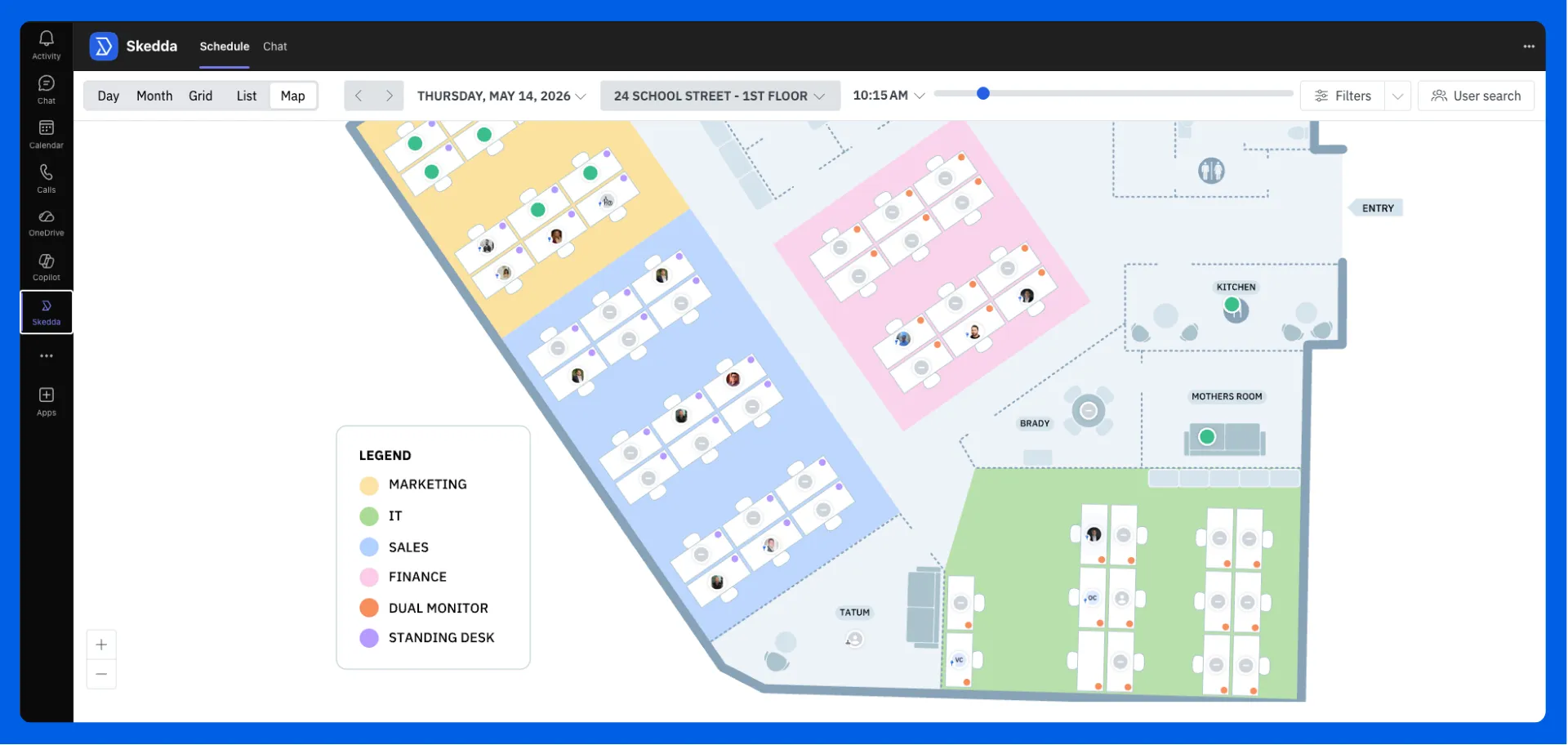
Interactive Floor Plans. Instead of a list of room names, employees see an interactive map of your office. Available desks and rooms are color-coded by real-time status. Creating and editing maps is easy with Skedda’s design team too. There’s no need for IT involvement or knowledge of complex PowerShell commands.
Governance in the admin UI. Lead time, cancellation cutoffs, day-specific rules, role-based priority, per-team booking caps: all configurable without PowerShell. Facilities can iterate on policy without filing an IT ticket.
Workplace Intelligence. Utilization by space type, booking-to-occupancy gaps, peak demand patterns, and no-show rate. The report leadership keeps asking for is a few clicks away.
Authority. Skedda is G2's #1 Space Management software for 2026 and has been a G2 Leader for three consecutive years. 8,000+ organizations rely on it across roles spanning facilities, IT, HR, and workplace leadership.
If Office 365 is doing the job, keep doing it. There's no prize for switching platforms when the current one works.
But if you're spending more time on PowerShell scripts than on the workplace strategy your team was hired to build, the math has shifted. Native Microsoft tools are infrastructure. A dedicated workspace platform is the operating layer on top. The right setup gives your team the Outlook and Teams workflows they already know, plus the governance, analytics, and reach that the native stack stops short of.
Skedda is built for that layer, and built to connect to the Microsoft infrastructure your team is already on.
See it on your own floor plan. Request a demo.
Does Office 365 have a built-in meeting room booking system?
Sort of. Office 365 includes resource mailboxes for rooms, Outlook's Room Finder for picking them, and (newer) Microsoft Places for a buildings-and-floors view. There's no single tool labeled “meeting room booking system.” For small offices with a handful of rooms and no governance needs, the native pieces are enough. For multi-site operations or organizations that need rules, analytics, or non-room resources, a dedicated platform that uses Office 365 as the front-end fills the gap.
What's the difference between Microsoft Bookings and a meeting room booking system?
Microsoft Bookings is for appointment scheduling: booking a customer into a 30-minute consultation with one of your employees. A meeting room booking system books your own employees into your own physical spaces. They share the word “booking” but serve different jobs.
Can you book individual desks in Microsoft Teams without Shared Space Licenses?
Desk pools, where employees reserve a seat in a group of seats, are available out of the box. Individual desk booking, where a user picks a specific seat, requires purchasing Shared Space Licenses. One license covers four desks. If your floor plan calls for structured hoteling and advanced booking rather than first-come, first-served pools, the licensing math adds up quickly.
How does Skedda integrate with Outlook and Teams?
Skedda syncs bookings two ways with Microsoft 365, so a booking made in Outlook appears in Skedda, and the reverse is true. Employees book rooms in Outlook using the standard meeting flow, book desks in Teams through the Teams app, and see availability live on an interactive floor plan. Admins keep the booking rules in Skedda's UI rather than in Exchange or PowerShell.
What does an Office 365-integrated booking system cost?
Skedda is priced per space rather than per user. Since the number of bookable spaces in a typical office is much smaller than the headcount, per-space pricing decouples booking cost from employee count. See the Skedda pricing page for current tiers.
Our team is ready and waiting to talk through your specific desk scheduling requirements and see how Skedda could work for you.

.svg)



