
New: Occupancy Insights.
Daily headcount, attendance trends, and RTO reports for your office.

Well, that’s a wrap for January. The “new year, new me” energy is still hanging around… which means now is the perfect time to lock-in and deliver on your new year’s resolution. They say it takes 66 days to form a habit, which means you have roughly a month to go.
Speaking of controlling your destiny, we shipped some pretty big updates in January. Let’s take a look.
This month, our team focused on giving admins better oversight without making everyone’s day-to-day booking experience feel like a bureaucratic obstacle course. Whether it’s managing high-demand spaces, tightening up identity management, or keeping deliveries from disappearing into the void, these updates help your workplace run reliably and smoothly.
Here’s what we built.
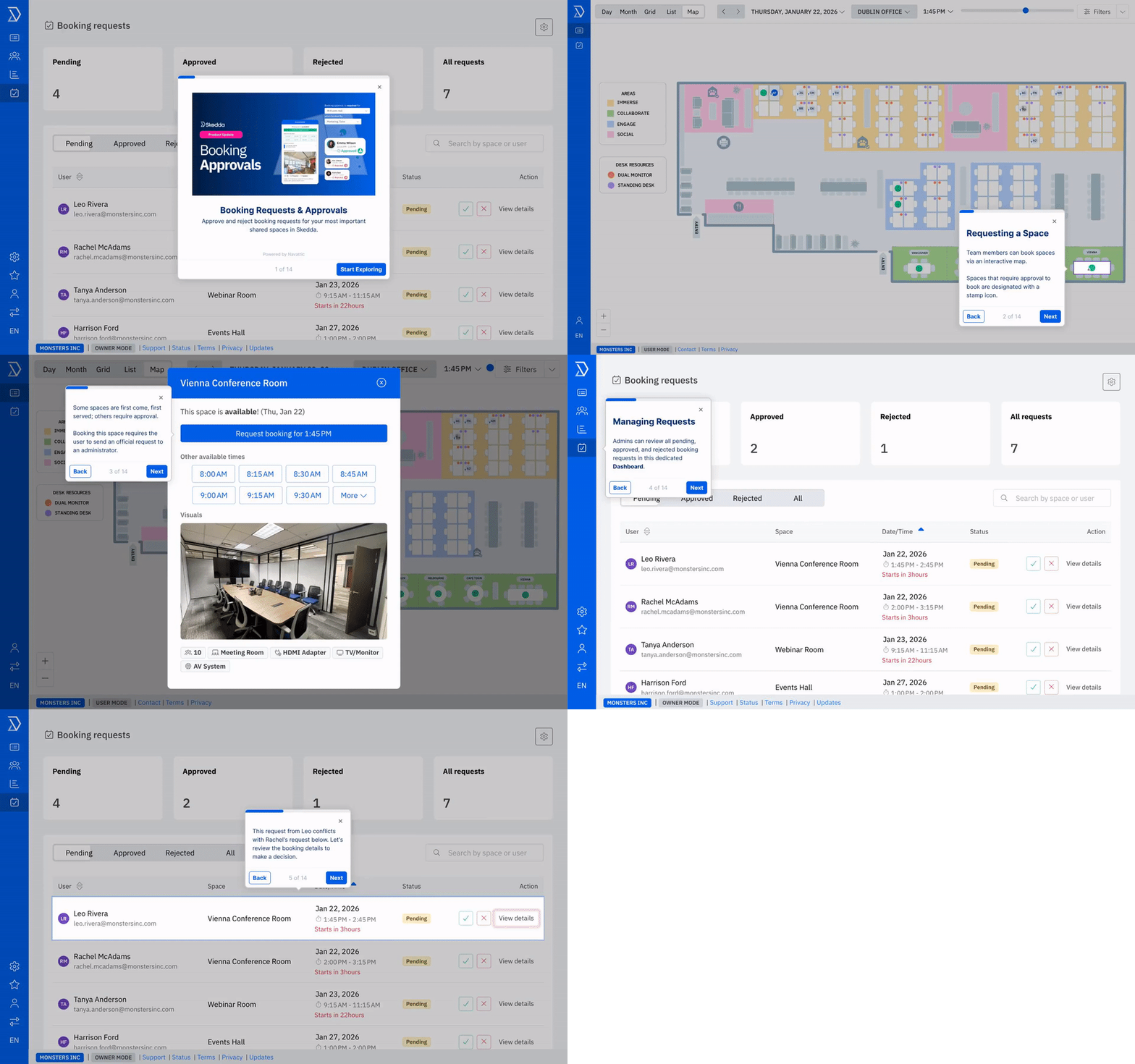
Some shared spaces shouldn’t be first-come, first-served. January was the month we finally gave those important spaces the care they deserve with proper approval workflows.
Skedda’s new Booking Approvals lets you set space-based rules that require users to submit a booking request instead of instantly creating a booking. Admins then review requests in a dedicated dashboard, approve or decline them, and include a note explaining the decision. Bookings are only created once approved, so you can manage demand fairly without blocking availability prematurely.
This feature was built for “high-stakes” spaces at your organization: think executive rooms, high-capacity event spaces, rentable assets, sensitive equipment, and anything else where “who clicked first” might lead to some less than ideal booking schedules.
Booking Approvals has been one of our most heavily requested features over the years. Now that it has finally arrived, our customers are solving real problems. But don’t take our word for it. Here’s what an actual Skedda customer had to say:
"Although we generally operate an open booking policy, [Approvals] gives us better control over our high-demand spaces – spaces that require specialist use or specific set-up."
– Niall McMahon, Facilities Manager, Northumbria Healthcare
Skedda Premier users can configure Booking Approvals by visiting Settings → Rules → Booking Requests in their account.
Read more: Booking Approvals (full breakdown + examples)
If your front desk has been stuck manually tracking and distributing incoming packages, this one’s for you.
Delivery Management lets couriers log their package deliveries at your office via kiosk check-in. Keep a record of key delivery details (recipient, courier, notes), automatically notify recipients when something arrives, and track pickup status so nothing gets “lost” in the most mysterious place of all: a shared countertop.
Deliveries is part of Skedda’s Visitor Management add-on, and can be accessed by going to Settings → Visitor Management → Visitor Set Up.
Admins asked. IT teams begged quietly into their keyboards. So: Skedda now supports SCIM provisioning with Okta.
That means organizations using Okta as their Identity Provider can:
SCIM works alongside SAML SSO for full identity lifecycle automation, expands our SCIM support beyond Microsoft Entra ID, and is available on the Premier plan.
This month was all about putting the right controls in the right places. Approvals for high-demand spaces, safer automation for identity management, and cleaner delivery tracking for front desk sanity. Less chaos. More confidence.
Want to stay up to date on what we’re shipping? Keep an eye on our product updates page. And if you’ve got feedback, requests, or strong opinions about how shared spaces should work, send them our way.
Our team is ready and waiting to talk through your specific desk scheduling requirements and see how Skedda could work for you.

.svg)



