
NEW
Booking data, wherever you need it:

Modern FMs sit at the intersection of data, people, and purpose. They collect the numbers, but their real impact comes from turning that data into stories leaders can understand and act on.
Those stories fuel organizational value and ROI. They justify investments, influence design decisions, and prove that a well-managed space isn’t just efficient—it’s engaging, productive, and profitable. Modern FMs are transforming from operators to analysts—connecting the dots between data and human experience to design workplaces that truly work. But there are challenges.

“We have an abundance of data — the challenge is sifting through it and telling the right story.”
Modern FMs have too much data to analyze and make sense of. Data fragmentation, inconsistency, and limited interoperability also continue to be major challenges. What's more, getting the data is sometimes difficult, as FMs often don’t realize they have (or can get) access because:
Most FMs develop data capabilities on-the-job through trial and error or peer coaching. Formal training in data analysis or digital tools are often overlooked. That’s a problem because when you don’t know how to use the data you have:
You don't need a full-scale analytics platform or a data science team to start making better workspace decisions. The data you need is likely already being collected somewhere in your organization. This guide will show you how to find it, analyze it, and turn it into actionable insights that leadership will actually listen to.
By the end of this guide, you’ll be able to identify the data sources you already have access to, perform simple but powerful analyses, and present compelling recommendations to leadership.
Let's get started.
Our team is ready and waiting to talk through your specific desk scheduling requirements and see how Skedda could work for you.
“The best way to begin is to begin” - Eleanor Roosevelt
Most organizations already collect data that can inform space decisions. The key is knowing where to look and what questions to ask. These six data sources represent the foundation of space analytics, and at least two or three are likely already available to you.
On average, outfitting an office costs $264 per rentable sq. ft. Knowing your peak and average occupancy over time using badge data can help you better allocate the space you have without having to build or rent more space.
Your security badge system is silently creating a treasure trove of utilization data. Every swipe captures who enters the building (by department, role, or individual ID), when they enter (time of day, day of week), how often they come in (attendance patterns), which buildings or floors they access, their entry versus exit patterns (time on-site), and peak occupancy times and trends.
Badge data is already being collected through your security or access control systems, which means you have historical context—often going back two to three years. It shows actual occupancy versus headcount assumptions, helping you separate who's authorized to use a space from who actually does. This data is invaluable for confirming trends like return-to-office rates and validating other datasets from Wifi, sensors, or booking systems.


Rightsizing office space by using utilization data helped NYC reduce its office space by 400,000 square feet and save $15 million in annual rent occupancy costs.
Booking systems capture intent to use space before anyone walks through the door. They tell you who books spaces (desks, meeting rooms, parking spaces), what types of spaces are in high demand, when spaces are reserved or released, cancellation and no-show rates, and how often individuals or teams book shared resources.
While badge data tells you who showed up, booking data reflects intent. This helps you understand demand signals even before occupancy occurs. It highlights over- or under-supplied room types, identifies patterns in team collaboration and hybrid work behaviors, and helps you rebalance your room mix and utilization policies. High cancellation rates might indicate your booking policies are too restrictive or that your room types don't match actual needs.

Occupancy data can lead to a 15% reduction in overall time spent cleaning underutilized spaces by providing a clear view of space utilization to influence future janitorial processes.
Sensors provide real-time presence at the desk, room, or zone level. They capture duration and frequency of use, space type performance (collaboration versus focus spaces), and detailed utilization patterns by hour or day. This is your most granular view of how space is actually being used.
Sensor data provides the most accurate read of actual space use, cutting through the ambiguity of badge swipes (which only tell you someone entered) and bookings (which only tell you someone intended to use a space). This data enables optimization of seat counts and space allocation, supports right-sizing and hybrid work modeling, and informs cleaning schedules, maintenance planning, and energy management.

Occupancy-based HVAC control can lead to ~6.1% annual whole‑building savings and reduce weekday AHU run times by 2 hours and 35 minutes per AHU per day.
Your building's mechanical and electrical systems generate continuous streams of data. This includes HVAC, lighting, temperature, CO₂, and humidity levels, energy usage and control patterns, sensor feedback from smart infrastructure, and system uptime, performance, and anomalies.
Building systems data directly connects comfort, efficiency, and occupancy. When you know where people actually are, you can enable demand-driven building operations—heating, cooling, and lighting spaces only when they're in use. This data identifies inefficiencies like lighting or HVAC running in unused zones and supports sustainability and ESG reporting by quantifying energy savings from space optimization.

Using insights gained from Wifi and badge data, organizations can make workplaces more efficient by identifying popular seating locations, arrangements, and employee roles in selected spaces.
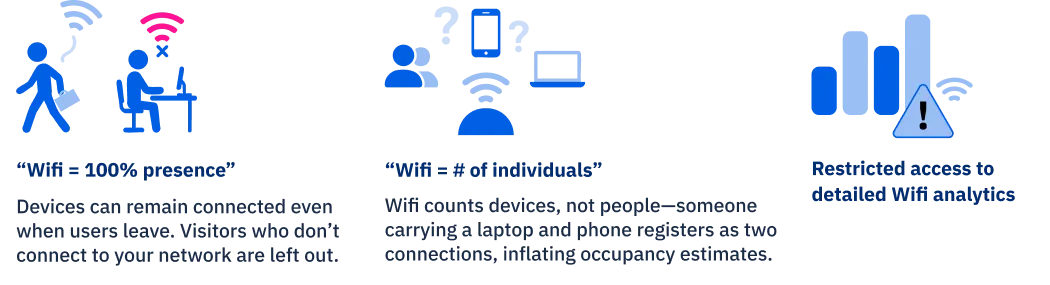
Your Wifi network creates a passive occupancy tracking system. It reveals where people connect (by Wifi access point or zone), how many unique users or devices are active, how long users stay connected, and when network demand peaks.
Wifi data acts as a passive utilization measure without requiring hardware installation beyond what's already in place. It covers all device-enabled occupants including employees, guests, contractors, and even IoT devices. The data provides movement patterns and dwell times by area, and it's excellent for validating other datasets like badge or sensor data. Because nearly everyone carries a connected device, it offers comprehensive coverage.
89% of employees who are satisfied with their physical workplace are also satisfied with their employer.
While qualitative data shows you what’s happening, surveys tell you why. Employee feedback captures sentiment about comfort, space, and design effectiveness. It provides qualitative insights on hybrid policies, amenities, and workplace preferences. You can see satisfaction trends by location, department, team, or event specific floors. Surveys reveal what drives people to come to the office and what keeps them away.
Your sensor data might show that a specific collaboration zone has low utilization, but surveys explain why—maybe it’s too noisy, poorly lit, or lacks the right technology. This qualitative context explains why people use or avoid certain spaces before problems escalate. Feedback identifies friction points that won’t appear in utilization data until they’ve already caused damage. More importantly, conducting surveys builds trust and transparency in your facilities management initiatives by showing employees their voices matter in space decisions

The Data Inventory Spreadsheet organizes over 50 potential data sources into 10 categories, including Access & Security, Space Management, Sensors & IoT, Building Systems, Network & Connectivity, HR & People, Financial Systems, Survey & Feedback, Location Services, and Environmental.
Use it to systematically identify which systems exist in your organization, who owns them, and how to access the data. Fill it out by meeting with stakeholders from Security, IT, Facilities, HR, and Finance. This inventory becomes your roadmap for data-driven space management.
Common pitfalls to avoid:


.svg)



