
NEW
Booking data, wherever you need it:

Un logiciel de réservation de bureaux permet aux employés de réserver un espace de travail (bureau, salle de réunion, place de parking, parfois une cabine téléphonique ou une zone tranquille) à l'avance, généralement par le biais d'un plan de bureau interactif. Il existe parce que le travail hybride a dépassé l'hypothèse selon laquelle chaque employé dispose d'un bureau permanent.
Il existe deux modes courants :
La plupart des plateformes modernes prennent en charge les deux, et les meilleures permettent aux administrateurs de configurer le mode par zone ou par bureau afin qu'un seul bureau puisse gérer le hot-desking en open floor et l'hôtellerie pour les quartiers d'équipe.
Selon JLL's 2024 L'avenir du travail Selon une étude, le taux d'utilisation moyen des bureaux dans les organisations hybrides se situe désormais entre 50 % et 65 %, ce qui signifie qu'environ un tiers à la moitié de chaque bureau est vide chaque jour. Les CBRE Sondage sur le sentiment des occupants du printemps 2024 a constaté que plus de 60 % des grands occupants réduisaient activement leur empreinte immobilière pour suivre cette nouvelle tendance. Le logiciel de réservation de bureaux est l'outil opérationnel qui permet cette réduction sans sacrifier l'expérience des employés.
Nous avons évalué 13 plateformes en fonction de six critères, pondérés en fonction de leur impact pratique sur la décision d'un milieu de travail hybride sur le marché intermédiaire :
Sources de preuves : Pages officielles sur les produits et les prix, signaux d'évaluation publics de G2 et Capterra et documentation directe sur les produits. Nous avons donné la priorité aux preuves du produit par rapport aux classements dans les annuaires et avons exclu les catégories vaguement adjacentes (planification des rendez-vous, réservation des clients, planification des services généraux).
Divulgation : Skedda publie ce guide. Pour éviter la taxe de crédibilité liée au fait que les fournisseurs se classent #1, Skedda est présenté comme une option vedette au-dessus de la comparaison numérotée plutôt que classée dans celle-ci. Les dix autres outils sont classés par ordre alphabétique et non par ordre de classement. Réévaluez les critères en fonction de vos propres priorités.
Skedda est une plateforme de gestion des espaces de travail et des espaces conçue pour la réservation et la gestion de bureaux, de salles de réunion, de parkings et d'autres ressources partagées. Il dessert plus de 8 000 organisations et plus de 3,19 millions d'utilisateurs dans le monde, avec plus de 72 millions de réservations traitées à ce jour.
Skedda est le Produit classé #1 sur G2 pour Space Management (2026) et un leader G2 en matière de logiciels de gestion de l'environnement de travail de 2023 à 2026, avec Prix G2 2026 pour le meilleur support et le plus facile à configurer dans la catégorie.
Idéal pour : Les entreprises du marché intermédiaire comptant entre 100 et 2 000 employés qui ont besoin d'un contrôle précis sur la manière dont les bureaux et les salles peuvent être réservés (par service, rôle, plage horaire, quota) sans renoncer à une expérience de planification interactive et conviviale pour les employés.
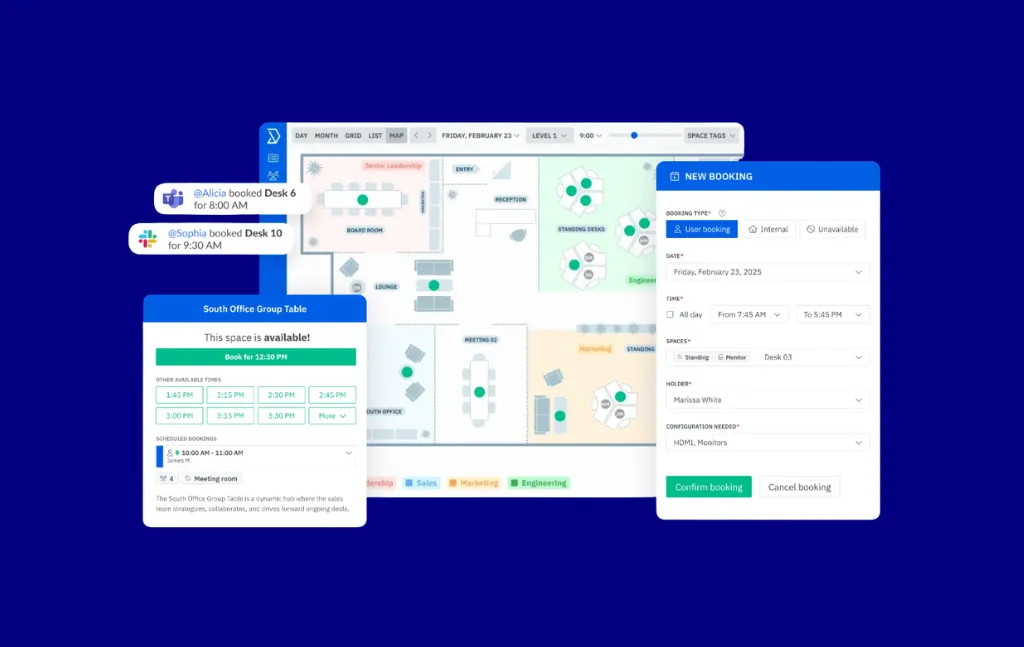
Le produit de base couvre plans d'étage interactifs avec disponibilité en temps réel, réservation de bureau (y compris hot desking et hôtellerie de bureaux), réservation de salle de réunion, une moteur de règles et de rôles entièrement personnalisable pour les autorisations de réservation et le contrôle d'accès, intelligence du lieu de travail et analyse de l'utilisation, des écrans de tablette pour une utilisation à la porte des chambres ou dans le hall d'entrée, et intégrations notamment Microsoft 365, Google Workspace, Microsoft Teams (Premier), Slack, Zoom, ServiceNow, Microsoft Entra ID et Okta SSO + SCIM (Premier), Google Sheets et Zapier (pour les envois sortants uniquement). La gestion des visiteurs et des livraisons est également disponible en tant que module complémentaire.
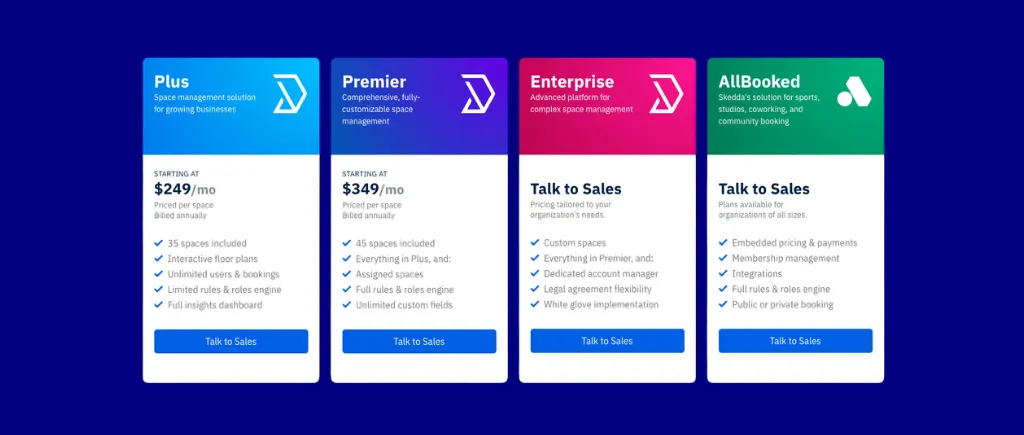
Tarification publique par espace : Plus coûte 249$ par mois (35 places incluses) ; Premier coûte 349$ par mois (45 places incluses). Le nombre d'utilisateurs est illimité sur tous les forfaits. UNE conversation de démonstration est recommandé pour le cadrage multi-sites ou pour les organisations qui ont besoin du moteur de règles de premier niveau, du SSO/SCIM et de l'application Teams. La gestion des visiteurs et des livraisons coûte 99$ supplémentaires par mois.


Conclusion : Skedda est le bon choix lorsque votre évaluation est axée sur la profondeur des règles de réservation, l'analyse de l'espace et une expérience utilisateur qui encourage une adoption rapide. Réservez une démonstration dès aujourd'hui.

Les estimations excluent les modules supplémentaires optionnels (gestion des visiteurs, capteurs, matériel), sauf indication contraire. Les outils ci-dessous sont classés par ordre alphabétique. L'ordre n'est pas un classement.
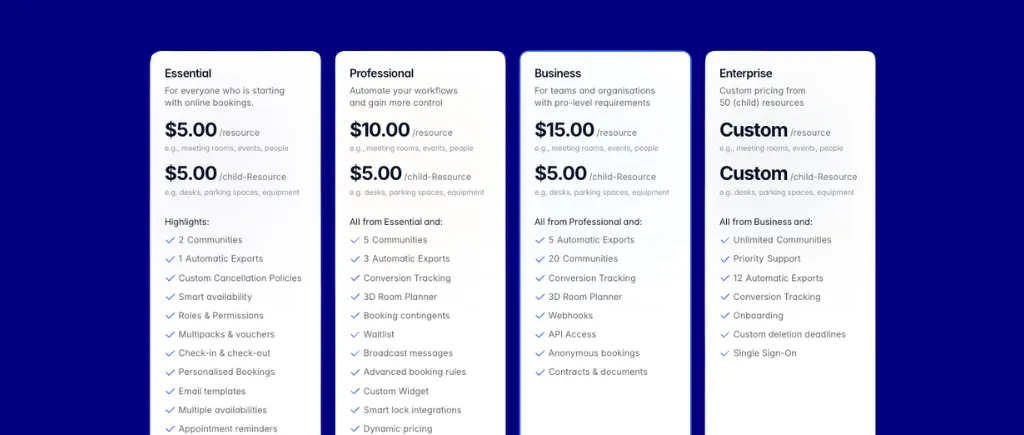
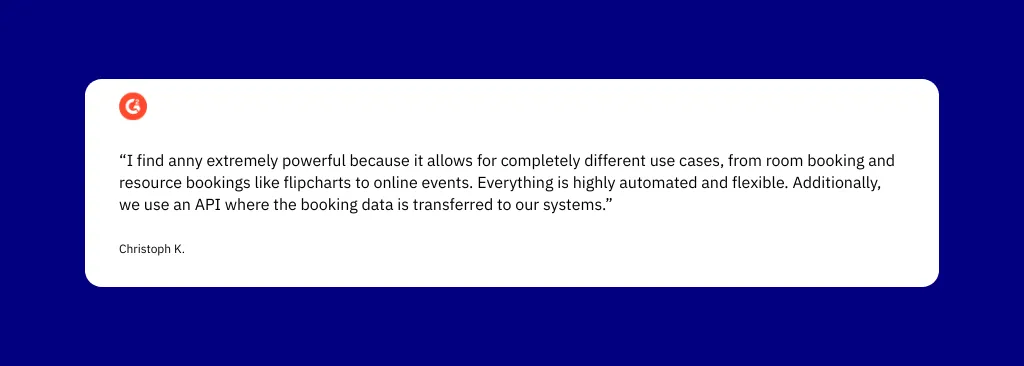
Anny est une plateforme de réservation tout-en-un qui dessert plus de 1 000 entreprises dans plus de 36 secteurs d'activité. Son modèle par ressource, dans lequel le nombre d'utilisateurs est illimité à tous les niveaux, contraste directement avec les outils par utilisateur qui pénalisent la croissance des effectifs.
Idéal pour : Les organisations qui souhaitent bénéficier d'une tarification illimitée pour les utilisateurs, d'un véritable plan d'étage en 3D et d'un accès physique basé sur un verrouillage intelligent lié aux réservations.
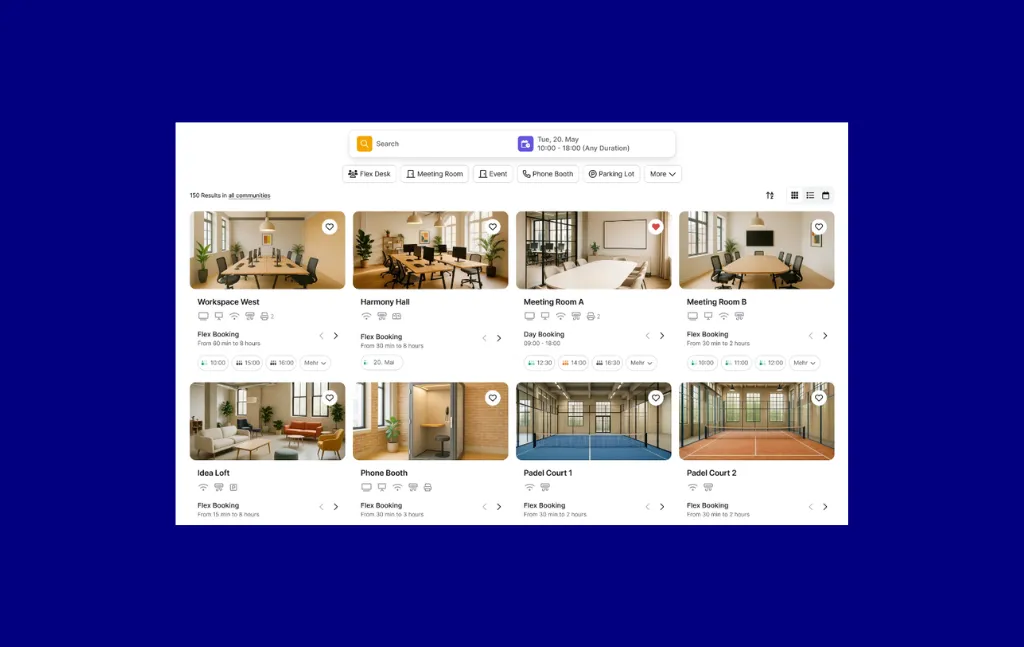
Plan de bureau interactif en 3D avec réservation en un clic et superposition d'occupation en temps réel, agenda hebdomadaire indiquant la présence de l'équipe, synchronisation bidirectionnelle du calendrier avec Google Workspace et Microsoft 365/Outlook, module complémentaire Outlook pour la réservation directe, application MS Teams pour la planification hebdomadaire et l'accès à la carte, facturation automatisée pour les réservations de chambres et vaste écosystème de verrouillage intelligent (plus de 7 intégrations nommées : Nuki, KleverKey, Tapkey, Salto KS, Dormakaba Exivo/Exos 9+ 300, UniFi Door Access, Keycafe) permettant des autorisations d'accès automatisées liées aux heures de réservation.
Le plan de bureau interactif en 3D constitue un véritable facteur de différenciation par rapport à ses concurrents uniquement en 2D. L'écosystème Smart-Lock est le plus vaste de cette comparaison, permettant un accès physique automatisé directement lié aux fenêtres de réservation. La synchronisation du calendrier Outlook reste active sans actualisation manuelle, une fonctionnalité fréquemment saluée dans les critiques.
Nombre illimité d'utilisateurs par ressource à tous les niveaux. Les forfaits payants commencent à 5€ par ressource réservable et par mois. Le plan Free Starter couvre 5 ressources avec un nombre illimité d'utilisateurs en permanence. Les prix sont publiés en euros uniquement.
Conclusion : Idéal pour les organisations qui souhaitent bénéficier de tarifs illimités pour les utilisateurs, d'un véritable plan d'étage en 3D et d'un accès physique basé sur un verrouillage intelligent lié aux réservations. La liste limitée d'intégration du SIRH constitue la principale lacune pour les besoins de provisionnement des entreprises axés sur les ressources humaines.
Archie est une plateforme de coworking et de gestion d'espaces de travail qui couvre la réservation de bureaux, la planification des salles de réunion, la gestion des visiteurs et les opérations de facturation/adhésion.
Idéal pour : Opérateurs de coworking ou bureaux hybrides avec des effectifs variables qui souhaitent une tarification par ressource et une intégration approfondie de MS 365 avec Slack.
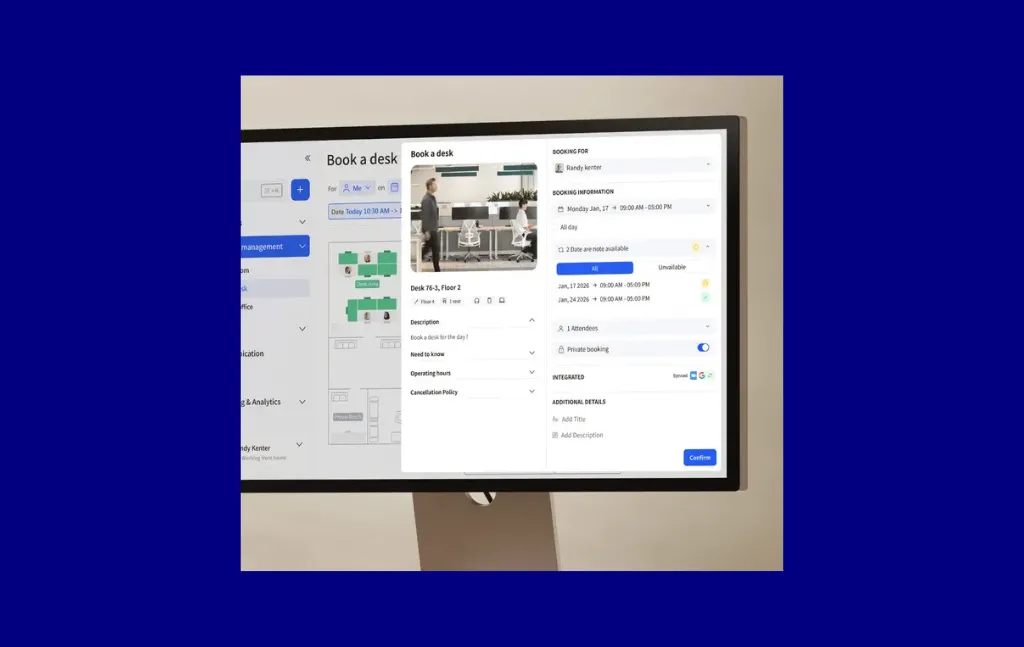
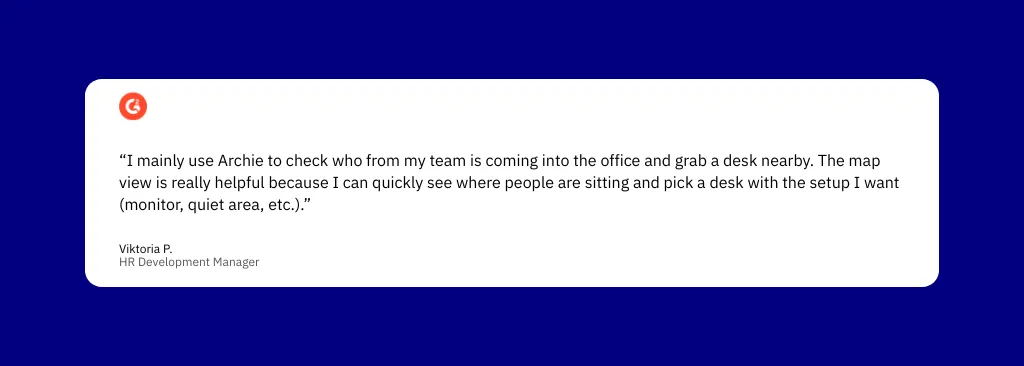
Plan d'étage interactif avec recherche de collègues et filtrage des équipements, tablettes de chambre avec disponibilité en temps réel, publication automatique par code QR des bureaux non réclamés, intégration de Microsoft Teams (réservation complète dans Teams), synchronisation bidirectionnelle entre Google Agenda et Outlook, bot Slack pour la réservation et la publication en un clic, SSO, SCIM, rôles personnalisés, personnalisation de la marque et synchronisation du répertoire Microsoft 365/Entra ID pour le provisionnement et le déprovisionnement automatiques des utilisateurs. La gestion des visiteurs est disponible en tant que module complémentaire distinct.
Le modèle de tarification par ressource est le principal facteur de différenciation ; l'ajout d'employés n'augmente pas les coûts. Le plan d'étage interactif avec outil de recherche de collègues permet aux employés de voir où se trouvent leurs collègues et de les filtrer par équipement avant de réserver.
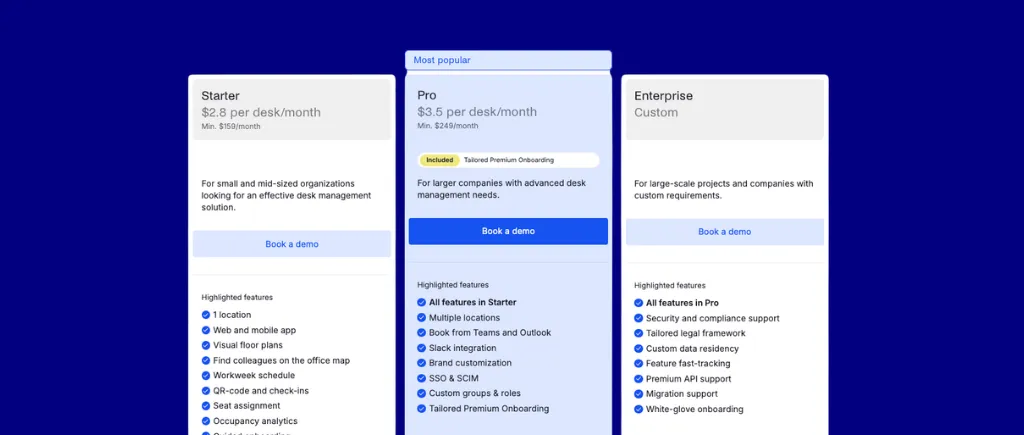
Par ressource (et non par utilisateur). Prix de départ : 2,80 $/bureau/mois + 8 $/chambre/mois (minimum 159 $/mois, 1 emplacement). Pro : 3,50 $/bureau/mois + 12 $/chambre/mois (minimum 249 $/mois, plusieurs emplacements). La gestion des visiteurs ajoute 109 $/mois (Starter) ou 185 $/emplacement/mois (Pro). Pas de forfait gratuit.
Conclusion : L'option la plus rentable pour les organisations qui souhaitent une tarification par ressource et une intégration approfondie de MS 365 à Slack. Particulièrement intéressant pour les opérateurs de coworking ou les bureaux hybrides à effectifs variables. Les acheteurs qui ont besoin d'un moteur de politique plus approfondi à l'échelle de l'organisation, d'une certification SOC 2 ou d'un suivi passif de l'occupation prêt à l'emploi voudront évaluer Skedda en parallèle.
Condeco (désormais rebaptisée Eptura Engage) est une plateforme de réservation de chambres et de bureaux destinée aux entreprises qui dessert plus de 2 000 entreprises mondiales. Il cible les équipes informatiques, des installations et des opérations sur le lieu de travail qui gèrent des portefeuilles immobiliers complexes.
Idéal pour : Les grandes entreprises complexes dotées d'une infrastructure MS 365 existante ont besoin de réservations assistées par IA, d'analyses d'occupation liées à Power BI et de la plus large couverture de méthodes d'enregistrement.
%2520platform.webp)
Complément Outlook Smart Calendar qui reréserve automatiquement les salles lorsque les réunions sont déplacées, chatbot Teams pour les réservations depuis le chat, AI Copilot pour les requêtes en langage naturel sur les bureaux et les salles, modèles Power BI pour l'analyse de l'occupation hors ligne, couverture la plus large des méthodes d'enregistrement (badge, mobile de proximité, carte RFID, code PIN à six chiffres, écran tactile des chambres, matériel de borne de réservation de bureau), intégrations de capteurs de fréquentation (Relogix, Metrikus, PointGrab), multi-sites filtrage des informations par pays/région/bureau/étage/zone/équipe, et réservation de services pour la restauration et les ressources informatiques.
Le complément Outlook Smart Calendar réserve automatiquement des salles alternatives lorsque les réunions sont déplacées et en informe les participants, sans que l'organisateur n'ait à trouver manuellement une salle de remplacement. La couverture d'enregistrement est la plus étendue de cette comparaison. L'AI Copilot accepte les requêtes en langage naturel.
Par utilisateur, sur la base d'un devis. Selon des estimations de tiers, le coût se situe entre 10 et 14 dollars par utilisateur et par mois pour les organisations comptant environ 1 000 utilisateurs. Engagement annuel requis. Pas d'essai gratuit.
%2520pricing.webp)
%2520desk%2520booking%2520review.webp)
Conclusion : Le choix idéal pour les grandes entreprises complexes dotées d'une infrastructure MS 365 existante qui ont besoin de réservations assistées par l'IA, d'analyses d'occupation liées à Power BI et de la plus large couverture de méthodes d'enregistrement. Ce n'est pas une option pratique pour les PME ou les bureaux hybrides en phase de démarrage.
Deskbird est une plateforme de réservation de bureaux et de chambres conçue pour les lieux de travail hybrides, destinée aux PME et aux moyennes entreprises. Il se distingue par une intégration native approfondie de Microsoft 365, des recommandations de bureau basées sur l'IA et une architecture modulaire multiproduits introduite en 2025.
Idéal pour : Des équipes du marché intermédiaire centrées sur MS 365, composées de 50 à 500 personnes, qui ont besoin d'un provisionnement automatique des utilisateurs piloté par le SIRH et d'une réservation assistée par l'IA dans Teams et Outlook.
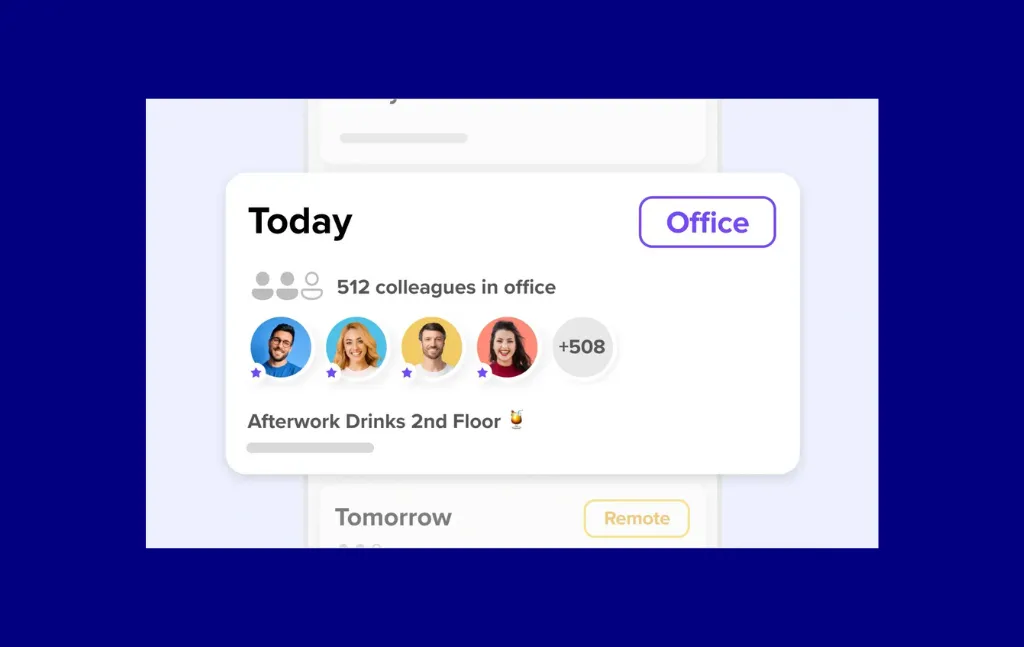
Réservation complète de bureaux et de chambres dans Microsoft Teams, module complémentaire Outlook pour la réservation basée sur le calendrier, recommandations de bureau basées sur l'IA sur les réservations passées et les collègues suivis, enregistrement automatique basé sur le géorepérage, flux personnel avec suivi des collègues et réservation automatique des préférences de travail hebdomadaires, suivi de la conformité aux politiques de bureau hybrides et connectivité SIRH via l'agrégateur Merge couvrant plus de 14 systèmes nommés (BambooHR, Workday, SAP SuccessFactors, ADP Workforce Now, Personio, HiBob, Factorial, UKG, Rippling, Sage HR, PeopleHR, BreatheHR, Charlie, Lucca) avec automatisation provisionnement, déprovisionnement, synchronisation dynamique des groupes et mappage des gestionnaires.
La connectivité HRIS via Merge est la plus complète de cette comparaison : plus de 14 systèmes nommés avec provisionnement et déprovisionnement automatisés. La visibilité en temps réel des bureaux et des collègues dans Teams et Outlook est régulièrement saluée.
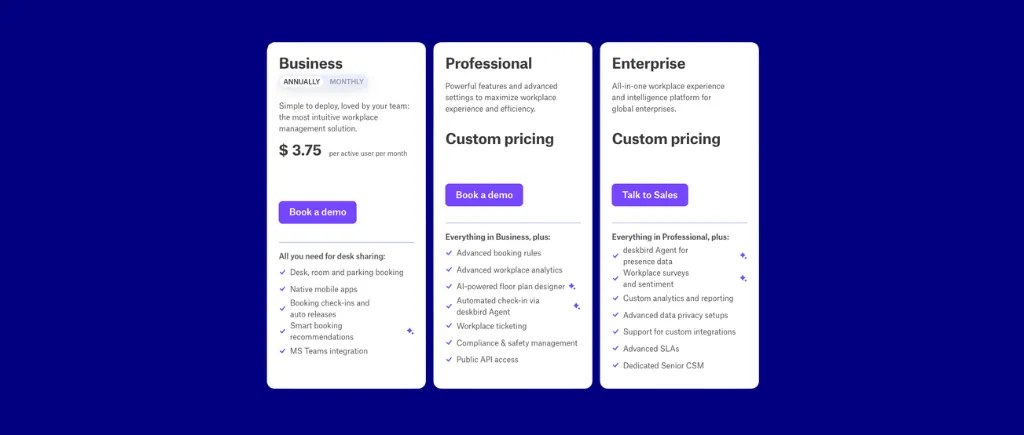
Par utilisateur. L'activité coûte 2,50 €/utilisateur/mois (~3,75 $ facturés annuellement). Pour 300 employés : ~1 125$ par mois pour la réservation des bureaux uniquement. La réservation des chambres (Rooms Plus) et la gestion des visiteurs (Visitors Plus) sont des modules complémentaires distincts à des coûts inédits par emplacement ou par chambre. Free Starter limité à 15 utilisateurs/1 bureau.
Conclusion : Idéal pour les équipes du marché intermédiaire centrées sur MS 365, composées de 50 à 500 personnes, qui ont besoin d'un provisionnement automatique des utilisateurs piloté par le HRIS et d'une réservation assistée par IA dans Teams et Outlook. Si le modèle par utilisateur vous inquiète à grande échelle, ou si SCIM/SAML et la profondeur de réservation récurrente sont des besoins fondamentaux, effectuez une comparaison par espace avec Skedda (le SCIM/SAML est inclus dans Skedda Premier plutôt que dans le mode fermé).
Dibsido est une plateforme de réservation de bureaux et d'espaces de travail pour les bureaux hybrides, destinée aux PME et aux équipes du marché intermédiaire à la recherche d'un système de réservation en libre-service à faible coût ne nécessitant aucune mise en œuvre informatique.
Idéal pour : Les PME sensibles aux coûts qui souhaitent un déploiement en libre-service sans informatique avec le prix d'entrée le plus bas de cette comparaison.
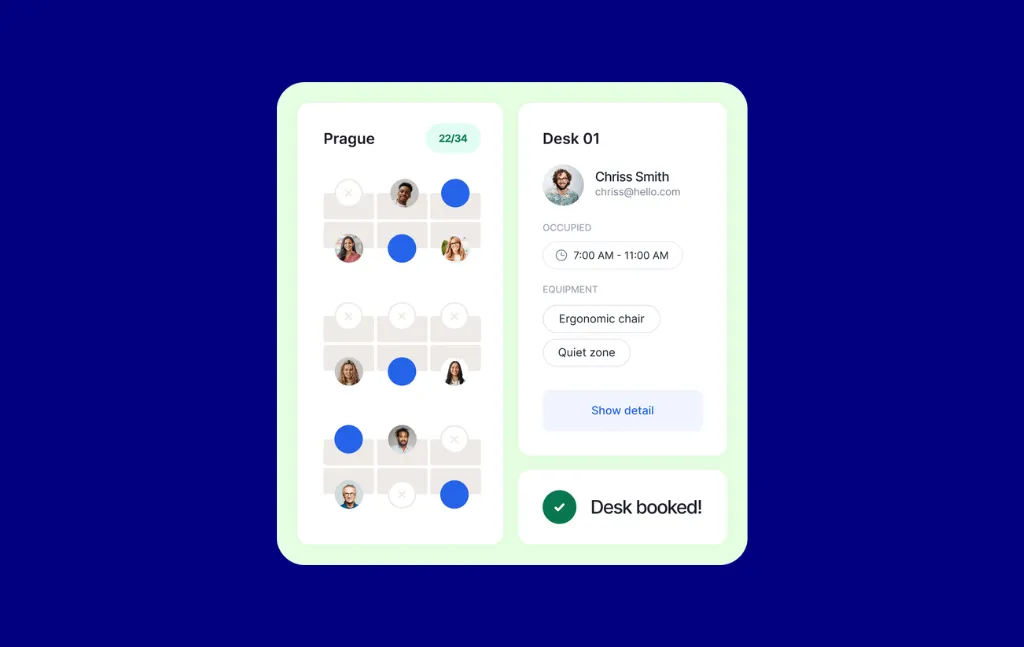
Plans d'étage interactifs pour les bureaux, les parkings, les salles de réunion, les voitures partagées et le covoiturage (plan tout-en-un), version à distance des bureaux fixes qui convertit automatiquement les bureaux attribués en hot desks lorsque le propriétaire travaille à distance, intégration native de MS Teams (depuis Microsoft AppSource) dans Teams/Outlook/Copilot, synchronisation bidirectionnelle du calendrier avec Google et Outlook, SSO via Entra ID/Google SSO/SAML 2.0 et contrôles d'équité des plans de stationnement avec des limites de réservation mensuelles par utilisateur.
Le prix d'entrée publié le plus bas parmi les fournisseurs ici. Le lancement à distance d'un poste fixe est une fonctionnalité remarquable pour les équipes hybrides : les bureaux attribués sont automatiquement convertis en hot desks lorsque le propriétaire indique qu'il est distant. Les évaluateurs font l'éloge d'une configuration SSO fluide, de contrôles d'équité sur les cartes de stationnement et d'une assistance réactive.
Par utilisateur. Réservation de bureau : 1,7 €/utilisateur/mois (annuel) avec un niveau gratuit jusqu'à 20 utilisateurs. Tout-en-un : 2,5 €/utilisateur/mois (annuel), y compris les bureaux, le parking, les salles de réunion, les voitures partagées et le covoiturage. Pour 300 employés sur All-in-One : ~825 $/mois. Les salles de réunion et le parking sont des suppléments, même sur les forfaits payants.
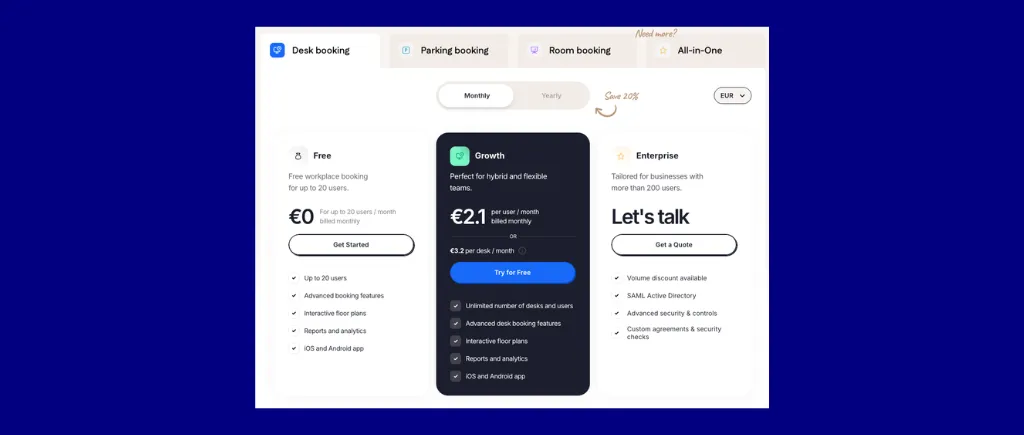

Conclusion : Idéal pour les PME sensibles aux coûts qui souhaitent un déploiement en libre-service sans informatique. Les organisations qui ont besoin d'une synchronisation du SIRH ou d'une automatisation approfondie atteindront rapidement le plafond d'intégration.
Eden est une plateforme de travail hybride modulaire qui couvre la réservation des bureaux, la planification des chambres, la gestion des visiteurs, la billetterie interne, les livraisons et la sécurité des équipes. Prix à la carte : chaque produit est acheté indépendamment.
Idéal pour : Bureaux hybrides de taille moyenne qui souhaitent une tarification prévisible par ressource et qui ont besoin de regrouper la billetterie des bureaux, des salles et des équipements informatiques internes.
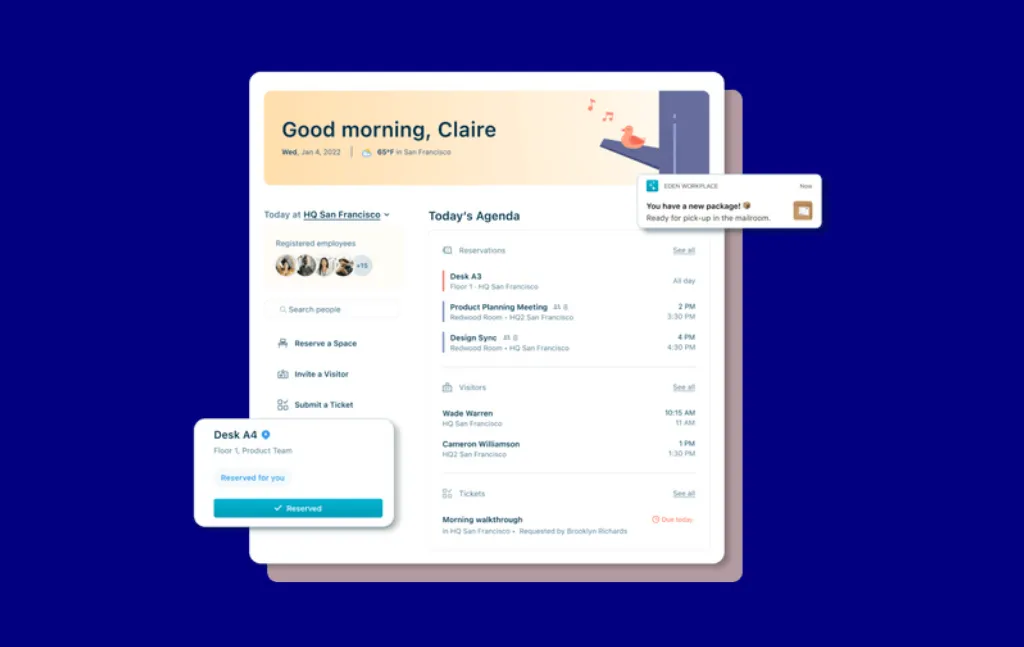
Réservation de bureau avec enregistrement basé sur Slack, planification des chambres, module de billetterie interne natif, réservation de bureau récurrente, applications Slack et Microsoft Teams natives pour tous les produits, prise en charge SSO de plus de 25 fournisseurs d'identité et provisionnement automatique SCIM via Workday, BambooHR, Rippling, Hibob et Gusto.
La tarification par ressource la plus claire de cette comparaison. Le module natif de billetterie interne étend Eden au-delà de la simple réservation d'espaces. L'enregistrement au bureau via Slack est la fonctionnalité la plus appréciée des critiques.
À la carte par ressource. Réservation de bureau : 2,25 $/bureau/mois (annuel, vendu par lots minimum de 25 bureaux). Démarrage de la réservation des chambres : gratuit ; Accélération : 15 $/chambre/mois. La gestion des visiteurs, les livraisons et la billetterie interne ne sont disponibles que sur devis.
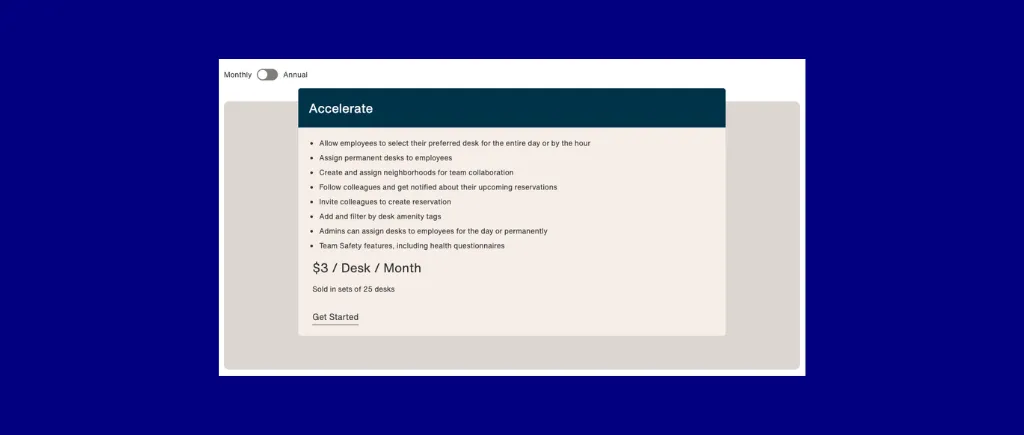
Conclusion : Idéal pour les bureaux hybrides de taille moyenne qui souhaitent une tarification prévisible par ressource et qui ont besoin de regrouper la billetterie bureau + salle + informatique et installations internes. L'expérience de réservation basée sur Slack a fait ses preuves en production ; l'expérience utilisateur de réservation de chambres doit être améliorée.
Envoy est une plateforme de travail modulaire qui couvre la gestion des visiteurs, les réservations de bureaux et de chambres, le parking, l'affichage numérique, la salle de courrier et les notifications d'urgence gérées à partir d'un tableau de bord unique.
Idéal pour : Bureaux hybrides d'entreprise nécessitant des intégrations approfondies en matière de contrôle d'accès, d'identité et de conformité des visiteurs auprès d'un seul fournisseur.
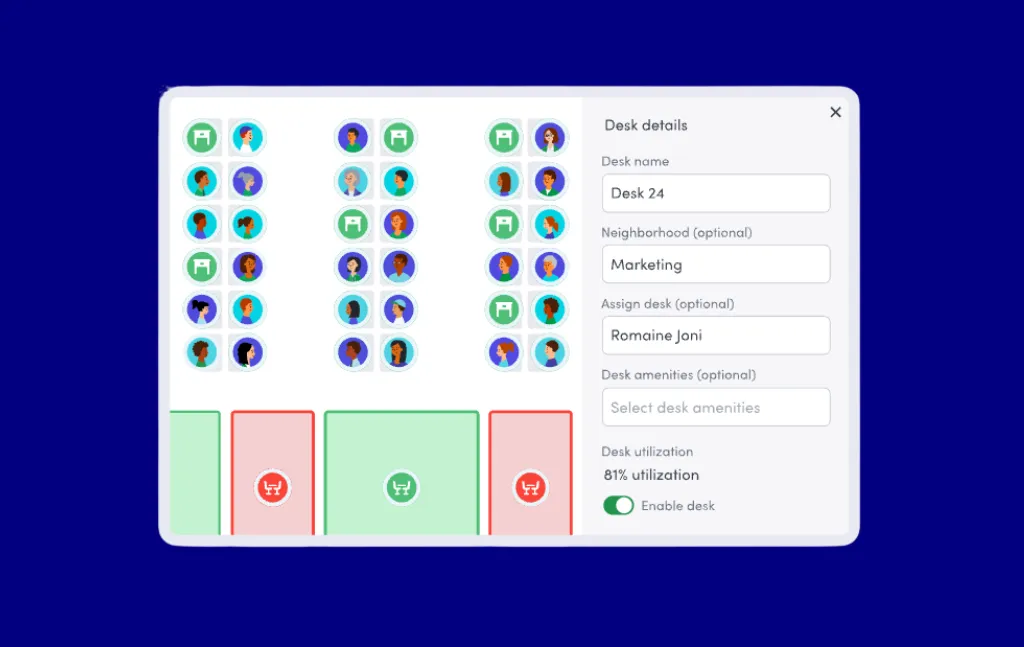
Réservation native depuis Google Agenda ou Outlook, activation automatique en cas d'enregistrement manqué, gestion des visiteurs avec notifications instantanées de l'hôte via Slack/Teams/SMS/e-mail, gestion multisite à partir d'un tableau de bord d'administration unique et liste d'intégration la plus complète de cette comparaison : plus de 100 connecteurs nommés, notamment des capteurs de contrôle d'accès, de communication, d'identité et d'occupation, ainsi que Zapier, IFTTT, Power Automate, Pipedream et des API/Webhooks ouverts.
La réservation native au calendrier signifie que les employés ne quittent jamais Google Agenda ou Outlook. La liste d'intégration, avec plus de 100 connecteurs nommés, est la plus complète de cette comparaison. La gestion des visiteurs avec des notifications instantanées à l'hôte est régulièrement citée comme un moyen d'éliminer les frais généraux des réceptionnistes.
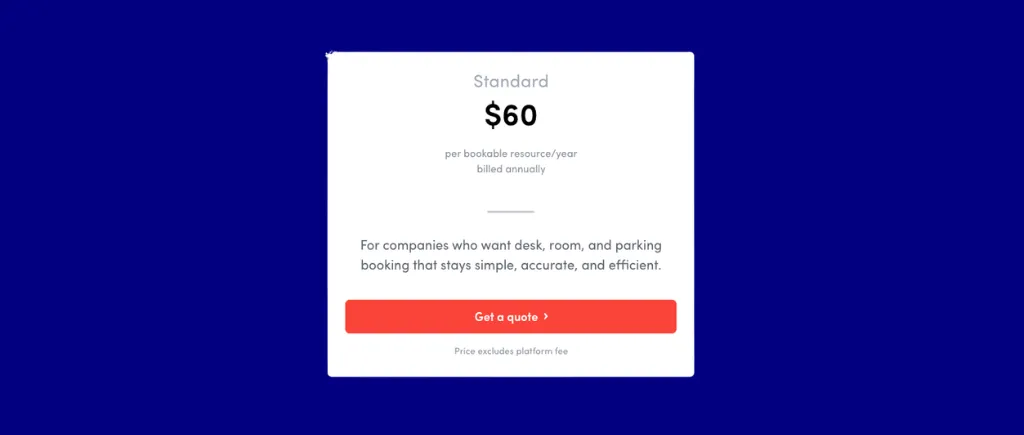
Modulable par ressource. Réservations standard : 60$ par ressource réservable par an, couvrant le hot desking, l'hébergement, les sièges permanents, la réservation des chambres, le parking et la libération automatique. Des frais de plateforme obligatoires (annuels fixes, non publiés) sont requis en plus du prix de tous les modules. Le module Visiteurs ajoute 109$ à 329 $/emplacement/mois. Les notifications d'urgence ajoutent 24$ par utilisateur et par an.

Conclusion : Le meilleur choix pour les bureaux hybrides d'entreprise nécessitant des intégrations approfondies en matière de contrôle d'accès, d'identité et de conformité des visiteurs auprès d'un seul fournisseur. Les acheteurs du marché intermédiaire qui n'ont besoin que de la réservation d'un bureau et d'une chambre peuvent trouver la structure de coûts modulaire fastidieuse.
Floor Plan Mapper est une plateforme SaaS et sur site qui convertit les plans d'étage au format CAD, PDF ou JPG en plans de bureau interactifs, consultables et réservables. Il se distingue par une tarification forfaitaire par plan d'étage et une licence perpétuelle sur site.
Idéal pour : Les organisations centrées sur MS 365 qui souhaitent payer par plan d'étage plutôt que par utilisateur ou bureau et qui peuvent souhaiter une option sur site.
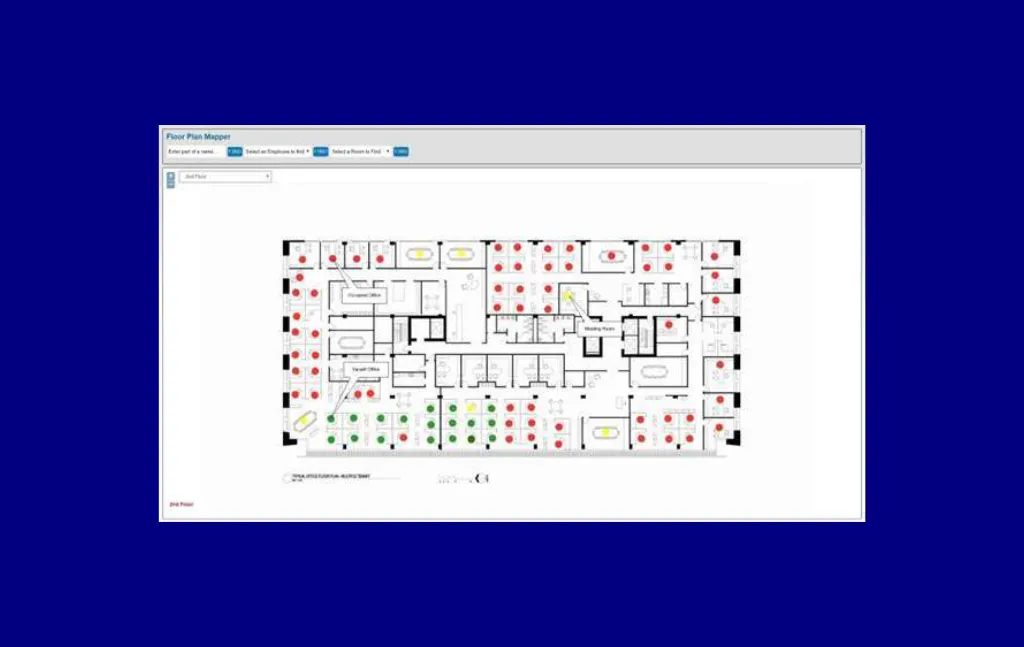
Plans de bureau interactifs, consultables et réservables convertis à partir de plans d'étage CAD/PDF/JPG, réservations à intervalles récurrents, réservations déléguées par les administrateurs, rappels du calendrier Outlook, intégration MS 365 (synchronisation des photos et des profils des employés Azure AD/Windows AD, réservation de salles Outlook/Exchange avec synchronisation automatique du nom et de la capacité, application de plan d'étage Teams avec AI Indoor Mapping Chat Bot, intégration SharePoint) et prise en charge du provisionnement SCIM.
La tarification est structurellement différente de celle de tous les autres outils disponibles ici : un nombre illimité d'utilisateurs et de bureaux à tous les niveaux, sans évolutivité par utilisateur ou par bureau. L'option de licence sur site est unique dans cette comparaison. L'intégration complète est signalée en moins d'une heure.
Plan d'appartement par étage. SaaS Tier 1 : 28$ par mois (couvre deux étages, un nombre illimité d'utilisateurs et de bureaux). Les niveaux 2 à 4 sont décrits mais ne sont pas chiffrés (« quelques plans d'étage », « de taille moyenne à grande », « aucune limite »). Licence sur site : forfait unique de 75$ à 150$ par étage avec assistance à vie et mises à niveau annuelles gratuites. Toutes les fonctionnalités sont incluses à tous les niveaux ; aucune fonctionnalité n'est limitée. 15 % de réduction pour les établissements d'enseignement et les organisations à but non lucratif.
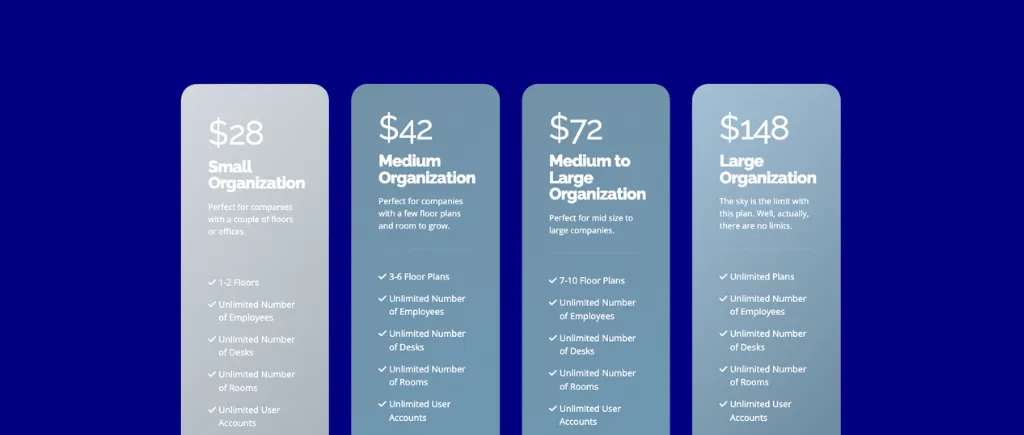

Conclusion : Idéal pour les organisations centrées sur MS 365 qui souhaitent payer par plan d'étage plutôt que par utilisateur ou bureau et qui souhaitent peut-être opter pour une option sur site. L'examen public unique rend la validation indépendante difficile.
Kadence est une plateforme de travail hybride intégrant Microsoft Teams et Slack natifs, un enregistrement automatique multisignal, Office Neighborhoods pour l'attribution des zones d'équipe et une facturation par utilisateur actif, ce qui signifie que les clients ne paient que pour les utilisateurs qui réservent réellement au cours d'un mois donné.
Idéal pour : Des équipes hybrides pour les PME et les moyennes entreprises qui donnent la priorité à la réservation native Teams/Slack et à la coordination des journées d'équipe par rapport à des contrôles politiques approfondis.
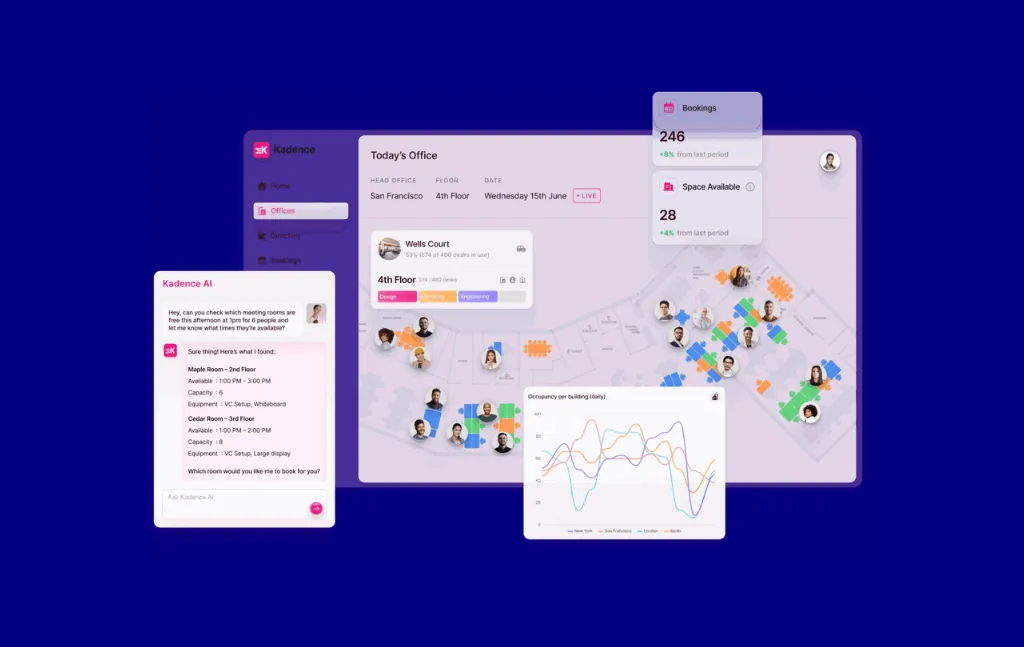
Applications Native Teams et Slack avec chat en langage naturel IA pour réserver et enregistrement par chat, enregistrement automatique multisignal (mobile, calendrier, présence Wi-Fi), quartiers de bureaux pour l'attribution des zones d'équipe avec règles de présence, annuaire des employés avec profils d'heures de travail et visibilité du statut de travail à distance, partage d'espace attribué avec libération automatique, demandes de bons de travail, formulaires de restauration liés aux réservations et annonces sur le lieu de travail.
La facturation par utilisateur actif est un modèle plus équitable pour les employés partiellement présents au bureau que la tarification forfaitaire par utilisateur. Les applications Native Teams et Slack permettent une réservation complète et une visibilité sur les journées d'équipe sans laisser de communications. L'enregistrement multisignal combine la présence d'un téléphone portable, d'un calendrier et d'une connexion Wi-Fi pour réduire les réservations fantômes.
Modèle de facturation basé sur un devis pour les utilisateurs actifs (ne payez que pour les utilisateurs qui réservent au cours d'un mois donné). Les frais d'installation de 250$ par plan d'étage sont documentés séparément du coût mensuel. Aucun tarif public par utilisateur. Pas d'essai gratuit.
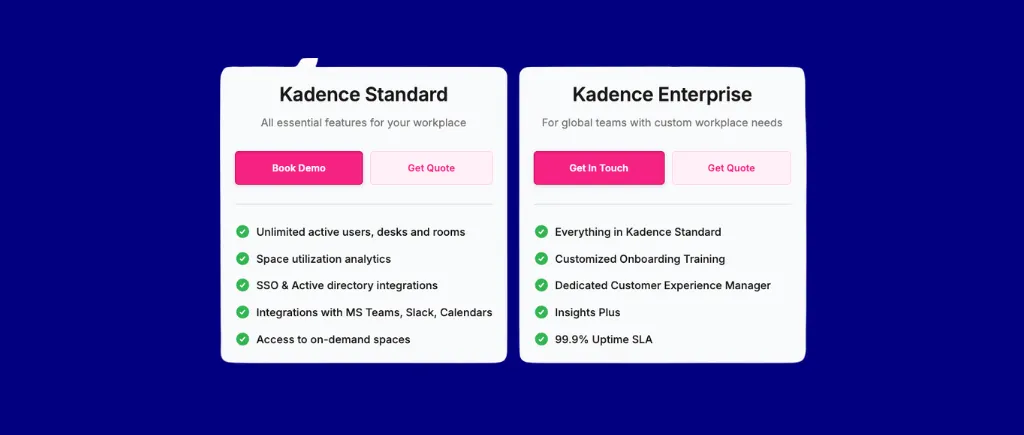

Conclusion : Idéal pour les équipes hybrides des PME et des moyennes entreprises qui donnent la priorité à la réservation native Teams/Slack et à la coordination des journées d'équipe par rapport à des contrôles politiques approfondis. Les acheteurs qui ont besoin d'appliquer des politiques à l'échelle de l'organisation, de quotas ou de règles d'éligibilité complexes trouveront plus de détails dans le moteur de règles par espace de Skedda.
OfficeSpace est une plateforme de travail d'entreprise adjacente à l'IWMS qui dessert plus de 1 700 équipes. Il cible les organisations de taille moyenne et les entreprises ayant des besoins complexes en matière de planification des espaces, de gestion des déménagements et de plan d'étage.
Idéal pour : Les moyennes entreprises et les entreprises ayant des exigences complexes en matière de gestion des déplacements, d'aménagement de l'espace et d'intégration de capteurs.
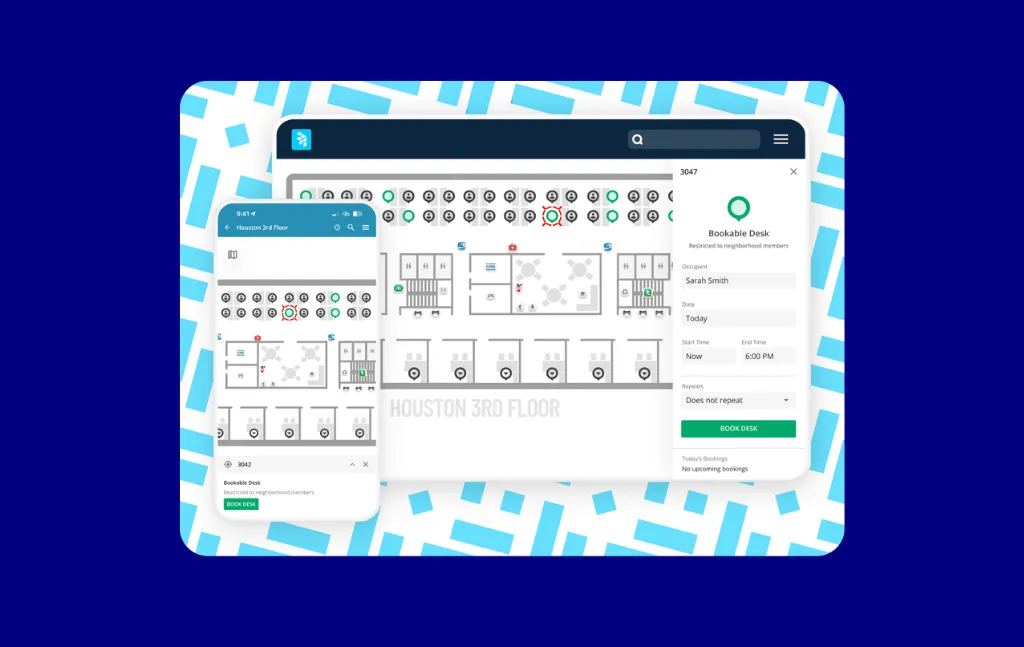
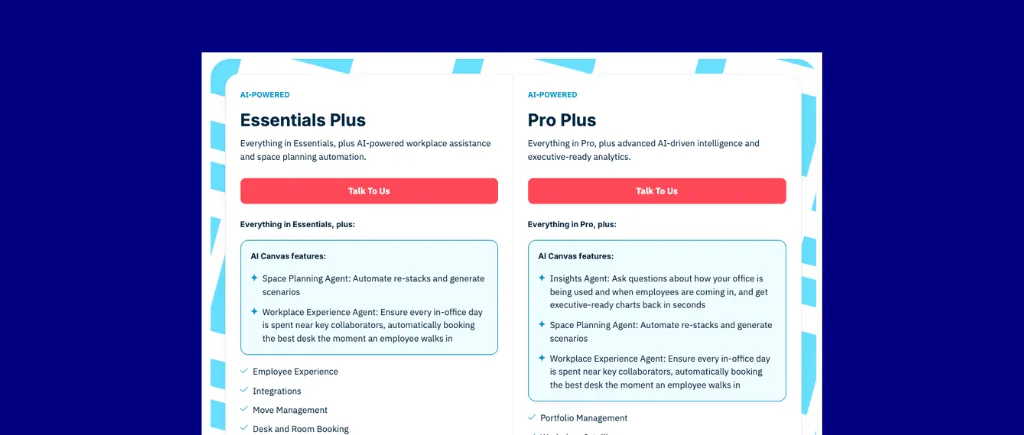
API de présence universelle pour une automatisation de l'occupation indépendante des capteurs, AI Canvas (Ossie) pour la génération de mises en page assistées par l'IA, la planification de scénarios et la réservation en langage naturel, éditeur de plans avec outils de planification des piles et des déménagements, prêt de bureaux (les employés libèrent les espaces assignés lorsqu'ils ne sont pas au bureau), gestion des visiteurs, gestion des actifs avec suivi de l'amortissement et planification de la maintenance, demandes d'installations, orientation avec recherche de collègues, indicateur de présence pour le partage du statut des bureaux et gestion multi-sites via une vue cartographique du monde.
L'API Universal Presence permet une automatisation de l'occupation indépendante des capteurs dans des flottes de matériel mixtes, ce qui constitue une fonctionnalité unique. AI Canvas (Ossie) prend en charge la génération de mises en page et la planification de scénarios assistées par l'IA. L'éditeur de plans d'étage doté d'outils de planification des empilages et des déplacements constitue un véritable facteur de différenciation pour les entreprises.
Modèle basé sur des devis ; par utilisateur. Aucune carte à tarif public. La mise en œuvre, le matériel et les intégrations de capteurs sont généralement facturés séparément. Même le plan Lite regroupe des fonctionnalités de gestion de l'espace.

Conclusion : Idéal pour les moyennes entreprises et les entreprises ayant des exigences complexes en matière de gestion des déplacements, d'aménagement de l'espace et d'intégration de capteurs. Les acheteurs qui n'ont besoin que d'une réservation de bureau et de chambre avec un plan d'étage épuré et un délai de rentabilisation plus rapide devraient se comparer à la tarification par espace de Skedda et à la procédure de déploiement la plus facile à configurer.
Robin est une plateforme d'environnement de travail d'entreprise largement déployée dans de grandes organisations hybrides complexes. Il possède un bon ensemble de fonctionnalités, mais il est également coûteux et sa mise en œuvre complète peut prendre beaucoup de temps.
Idéal pour : Les entreprises comptant plus de 1 000 employés qui souhaitent bénéficier d'une expérience éprouvée en matière d'analyse et de planification des locaux grâce à la planification assistée par l'IA.
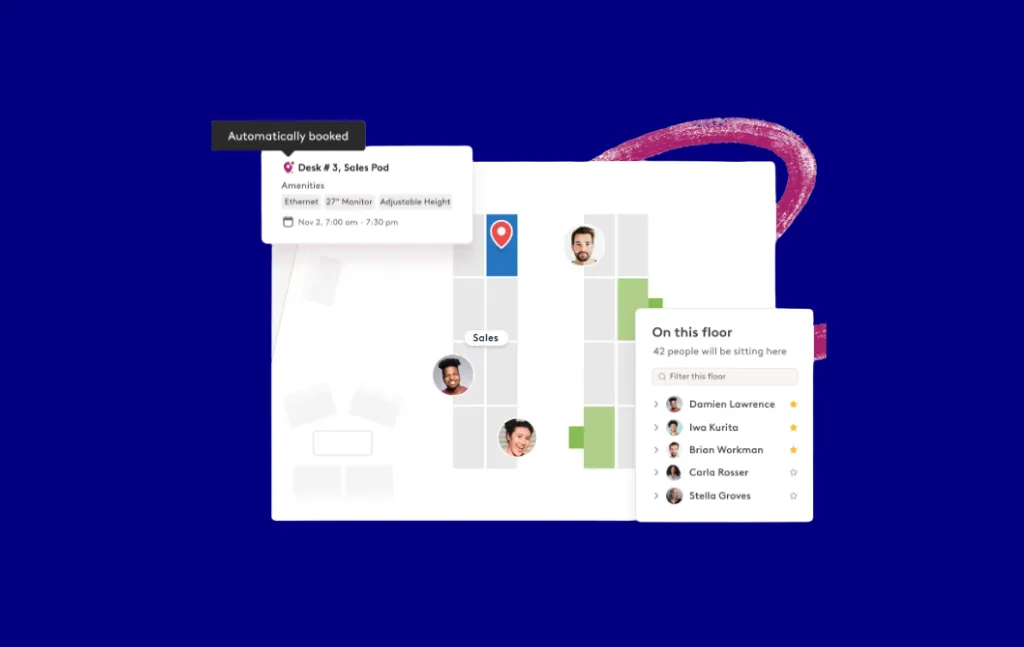
Agent de planification IA pour la résolution des conflits de réunions/les reprogrammes/la réservation prédictive, intégrations natives de Microsoft Teams et Slack, enregistrement automatique multisignal, Office Neighborhoods pour l'attribution des zones d'équipe, éditeur de plan d'étage puissant avec planification de scénarios, tableau de bord personnalisable (suivi des présences, prochaines visites, livraisons, demandes de service), services de réunion (restauration et configuration audiovisuelle liées aux réservations), intégration du contrôle d'accès utilisant des données de balayage de badges pour mesurer l'occupation réelle, réservation de chambres sur tablette et calendrier/vues d'équipe avec un collègue mise en favoris.
Analyse approfondie et automatisation de l'espace de travail : Robin indique que plus de 200 millions de bureaux ont été réservés auprès de sa clientèle. L'agent de planification IA gère la résolution des conflits de réunion et la réservation prédictive.
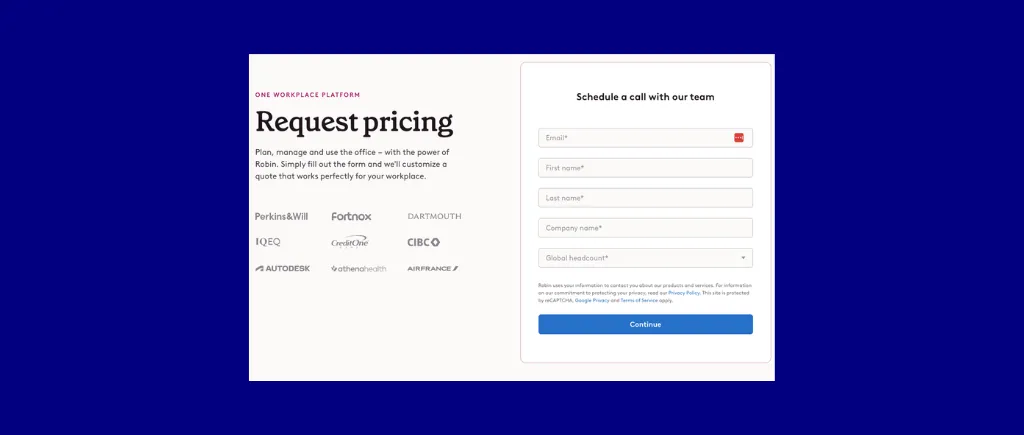
Sur la base de devis. Robin ne publie pas de tarifs par utilisateur ou par ressource. Des données provenant de tiers suggèrent des déploiements au niveau de l'entreprise auprès de plus de 1 000 utilisateurs. Module complémentaire de gestion des visiteurs au prix de 250 $/bâtiment/mois. Les mises à jour du plan d'étage entraînent des frais supplémentaires. Le support Premium est un module complémentaire payant.
Conclusion : Une démonstration vaut le détour pour les entreprises de plus de 1 000 employés qui souhaitent bénéficier d'une expérience mature en matière d'analyse et de planification des locaux. Les acheteurs des PME et des entreprises de taille moyenne bénéficieront probablement d'une meilleure prévisibilité des coûts ailleurs. La tarification par espace et le moteur de règles de gouvernance renforcées de Skedda constituent le contraste direct le plus net pour les acheteurs qui souhaitent une profondeur comparable sans mise à l'échelle des coûts par utilisateur.
YAROOMS est une plateforme de gestion des espaces de travail et des espaces destinée aux PME comme aux grandes entreprises dans plus de 65 pays. Tarification forfaitaire échelonnée : une organisation de 300 personnes paie un tarif mensuel fixe plutôt que des frais calculés en fonction de l'effectif.
Idéal pour : Les entreprises comptant plus de 100 à 300 employés qui souhaitent un coût total prévisible, quelle que soit la croissance de leurs effectifs, et qui ont besoin d'un assistant Teams AI natif.

Yarvis AI Assistant pour les réservations en langage naturel dans Teams et Slack (« Réservez une chambre pour 8 personnes le vendredi à 10h avec un projecteur »), des plans d'étage interactifs en 3D optimisés par MappedIn avec orientation et recherche de collègues, des limites de capacité basées sur le quartier ou la zone, des seuils de télétravail par site, un module de demandes de service (Enterprise), un suivi CO2/ESG et des options de déploiement Azure/AWS/on-prem (Enterprise)).
Trois niveaux publiés avec des chiffres financiers clairs facilitent l'autoqualification budgétaire. L'assistant Yarvis AI permet de réserver en langage naturel dans Teams et Slack avec une disponibilité en temps réel et une confirmation instantanée. L'intégration des équipes est régulièrement citée comme un moteur du flux de travail quotidien et le plan interactif avec recherche de collègues est fréquemment salué pour l'intégration des nouveaux employés.
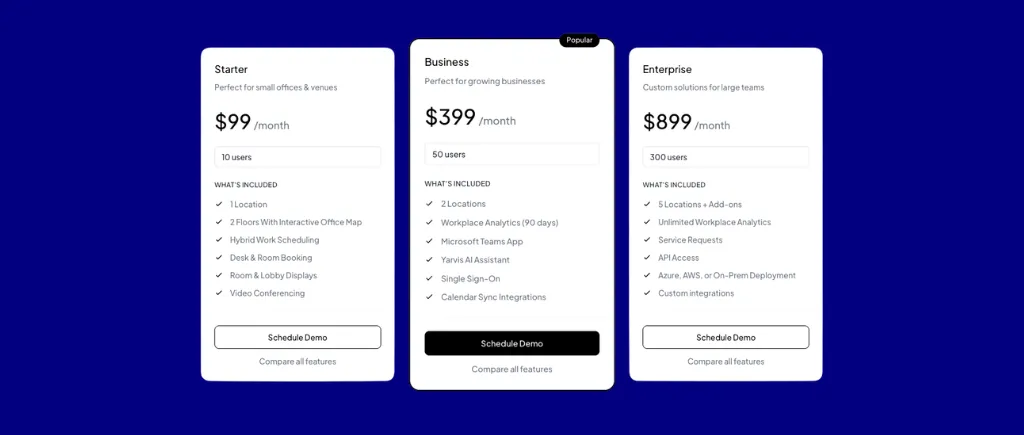
Tarif forfaitaire échelonné. Entrée : 99$ par mois (10 utilisateurs, 1 emplacement). Entreprise : 399 $/mois (50 utilisateurs, 2 sites, analyses sur 90 jours, application Teams, Yarvis AI, SSO, synchronisation du calendrier). Enterprise : 899$ par mois à partir de zéro (300 utilisateurs, 5 sites, analyses illimitées, accès à l'API, intégrations personnalisées). La gestion des visiteurs est un module complémentaire distinct à 99$ par emplacement/mois. 3 sites ajoutent 297$ par mois. L'IA et le SSO de Yarvis ne sont pas disponibles sur Starter.

Conclusion : La meilleure option forfaitaire pour les organisations de 100 à 300 employés et plus qui souhaitent un coût total prévisible, quelle que soit la croissance de leurs effectifs, et qui ont besoin d'un assistant Teams AI natif. Validez l'expérience mobile iOS avant de vous engager.
Découvrez les résultats de Skedda par rapport à votre scénario—réservez une démo dès aujourd'hui.
Au-delà des 12 critiques détaillées ci-dessus, les plateformes suivantes méritent d'être envisagées en fonction de votre contexte spécifique :
Les outils de réservation de bureau facturent de trois manières fondamentalement différentes, et chaque modèle modifie considérablement le coût total à moyenne échelle :
Dans un environnement de travail hybride où les employés partagent l'espace et les ressources, la tarification par ressource est nettement moins chère que par utilisateur. À mesure que les effectifs augmentent alors que l'inventaire des bureaux reste stable, cet écart se creuse.
L'intégration des calendriers (Google ou Outlook) est un enjeu de table. Tous les outils disponibles ici le prennent en charge. Les facteurs de différenciation :
Si votre politique exige des zones spécifiques à un département, des limites de réservations anticipées par rôle, l'approbation du responsable ou l'application de quotas, vérifiez que ces zones sont prises en charge avant de passer à la phase de démonstration. Skedda moteur de règles et de rôles couvre les quotas, les approbations administratives, les fenêtres de réservation, les limites d'avance, les buffers, les règles d'éligibilité, etc. Deskbird prend en charge les zones d'équipe, les fenêtres de réservation et les approbations des gestionnaires synchronisées par le HRIS. YAROOMS prend en charge les limites de capacité basées sur les quartiers et les zones et les seuils de télétravail par site. Envoy prend en charge les quartiers spécifiques à chaque département au niveau du plan.
Certains outils sont véritablement en libre-service (Dibsido propose une configuration en 5 minutes ; les réviseurs de Floor Plan Mapper signalent une intégration en moins d'une heure). D'autres nécessitent une démonstration guidée, une assistance à la mise en œuvre ou une configuration de plan d'étage assistée par le fournisseur. Eden nécessite une démo avant la période d'essai. Condeco nécessite un contrat d'un an et ne propose aucun essai. Kadence facture 250$ par plan d'étage pour le téléchargement. Intégrez le coût de déploiement au coût total de possession.
Le tableau de comparaison précédent normalise les prix publiés par rapport au scénario de l'acheteur. Les variables qui motivent caché les coûts sont généralement plus déterminants :
Quelle est la différence entre un hot desking et un hôtel de bureau ?
Le hot desking fonctionne selon le principe du premier arrivé, premier servi : les employés accèdent à tous les bureaux qui ne leur sont pas attribués à leur arrivée. L'hôtellerie de bureau utilise les réservations à l'avance : les employés réservent un bureau spécifique à l'avance, comme une chambre d'hôtel. La plupart des outils prennent en charge les deux, souvent configurables par zone. Skedda, Archie, Deskbird, YAROOMS, Envoy, Eden et Condeco prennent tous explicitement en charge les deux modes, en plus des sièges permanents/assignés.
Ai-je besoin d'un logiciel distinct pour la réservation des salles de réunion et la réservation des bureaux ?
Pas nécessairement. Tous les outils examinés ici gèrent les deux. La question pratique est de savoir si la réservation des chambres est incluse dans le plan de base ou si elle nécessite un supplément. Eden's Room Scheduling Accelerate coûte 15$ par chambre et par mois en plus de la réservation du bureau. Deskbird's Rooms Plus est un achat séparé. Envoy's Reservations Standard couvre les deux à 60 $/ressource/an. Skedda inclut la réservation de salles de réunion sur sa plateforme principale. Vérifiez avant d'acheter.
Comment évaluer un fournisseur qui ne publie pas de prix ?
Commencez par les fournisseurs qui publient (Skedda, Archie, Eden, Envoy, YAROOMS, Deskbird, Dibsido) pour établir une fourchette de coûts de référence. Adressez-vous ensuite aux fournisseurs proposant des tarifs opaques (Condeco, Robin, OfficeSpace, FM:Systems, Kadence) en fonction de critères spécifiques : nombre de bureaux, nombre de chambres, sites, employés et intégrations requises. Demandez un devis complet, comprenant les frais de plateforme, les modules complémentaires, le matériel et la mise en œuvre, et pas seulement un tarif par siège ou par ressource.
Quels outils proposent un plan gratuit adapté à un vrai pilote ?
Deskbird Starter (15 utilisateurs, 1 bureau), Dibsido (20 utilisateurs), Anny Starter (5 ressources, utilisateurs illimités), Eden Room Scheduling Starter et Envoy Visitors Basic sont tous gratuits. Aucune n'est viable pour un déploiement multi-sites sur le marché intermédiaire. Ce sont des outils de test fonctionnels, et non des outils de production. La plupart des outils payants proposent un essai de 14 jours après une brève démonstration.
Quel modèle de tarification est le plus rentable pour les bureaux hybrides ?
La valeur par ressource est généralement plus favorable que la valeur par utilisateur. Avec 300 employés mais seulement 150 bureaux (car seulement 50 % de l'équipe est présente chaque jour), un outil par utilisateur coûte 300 places tandis qu'un outil par ressource facture 150 bureaux. L'avantage augmente à mesure que le ratio employés/bureau augmente.
Le marché des logiciels de réservation de bureau couvre un large éventail de modèles de tarification, de profondeurs d'intégration et de complexités de fonctionnalités. Pour l'acheteur d'espaces de travail hybrides du marché intermédiaire (200 à 600 employés, 2 à 4 sites, ayant besoin d'un bureau en libre-service et d'une réservation de chambres avec des plans d'étage interactifs et des analyses d'utilisation), la liste des candidats sélectionnés est plus restreinte qu'il n'y paraît.
Commencez par la transparence des prix. Skedda, Eden, Archie et YAROOMS publient tous leurs tarifs de manière suffisamment claire pour vérifier leur budget en libre-service.
Adaptez le modèle d'intégration à votre stack. Les organisations centrées sur Microsoft 365 devraient examiner de près Skedda, Deskbird, YAROOMS et Archie. Les organisations principales de Google Workspace sont moins différenciées. La synchronisation des calendriers est quasi universelle, mais la connectivité HRIS est plus fine en dehors de Deskbird.
Traitez la gestion des visiteurs comme un élément de base. La plupart des outils (Skedda, Envoy, Deskbird, Eden et Archie) sont proposés en tant que module complémentaire distinct. Sur 3 sites, avec des fournisseurs facturés par site, cela peut ajouter 300 à 555 dollars par mois ; les modules complémentaires forfaitaires pour machines virtuelles (Skedda à 99 dollars par mois) permettent d'éviter cette évolutivité. Dans tous les cas, validez la rubrique avant de signer.
Ancrez l'évaluation des règles et des rôles par rapport à Skedda. Si votre politique de réservation nécessite une véritable profondeur (quotas, éligibilité, fenêtres anticipées, complexité des sites multiples), Skedda's moteur de règles et intelligence en milieu de travail constituent le point de comparaison le plus solide. Les tarifs Plus et Premier sont publics, vous pouvez donc vous qualifier en respectant votre budget. Une démonstration est recommandée pour la couverture multi-sites ou pour les exigences de niveau Premier, telles que SSO/SCIM et l'application Microsoft Teams.
Le bon outil n'est pas celui qui est classé premier dans une liste, y compris celle-ci. C'est celui qui obtient de bons résultats par rapport à vos critères pondérés, à votre stack d'intégration et à votre scénario d'achat. Utilisez la liste de contrôle des décisions pour évaluer chaque fournisseur présélectionné avant le premier appel de vente.
Réservez une démonstration pour découvrir comment Skedda s'adapte à votre scénario.
Notre équipe est prête à discuter de vos besoins spécifiques en matière de planification de bureau et de voir comment Skedda pourrait vous aider.

.svg)



